Test sequences Free Pro
Summary, next unit and amended revisions
When the last point is done, the summary tells you where the run stands. The summary, finishing and the test file library are free. Starting the next unit and amending a finished test file are part of Pro, a one-time purchase; see Pricing.
iOS and Android, beta this winter.
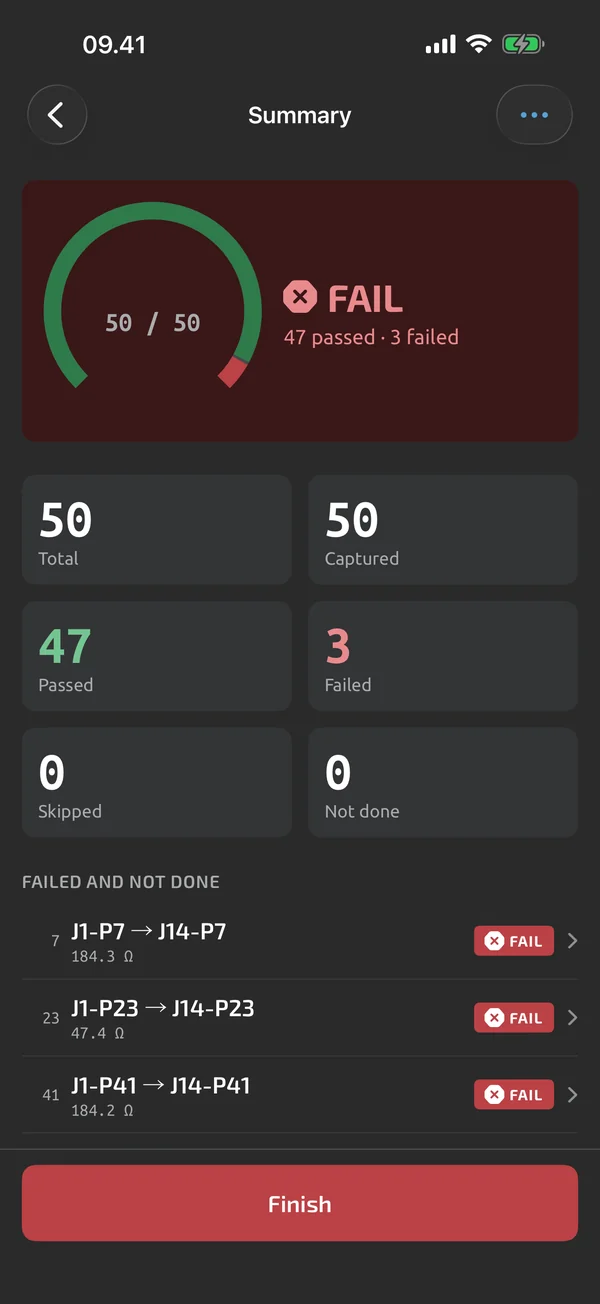
The summary
The overall result is PASS when nothing failed and all required steps are done, FAIL when any step failed, and INCOMPLETE when nothing failed but required steps are not done. Counts show total, captured, passed, failed, skipped and not done, with a breakdown per group. The failed and not-done steps are listed, and each opens for a redo.
Finish or abandon
Finish with required steps pending asks, for example, "3 required steps not done. Finish anyway?", and records them as not done. Finishing freezes the run as a test file that can't be edited, only amended. Abandon asks for confirmation and keeps the run, exportable but not counted as completed.
Next unit
Start next unit begins a new run of the same template with the metadata copied and the auto-increment fields advanced, for batch testing Pro.
Amend as a new revision
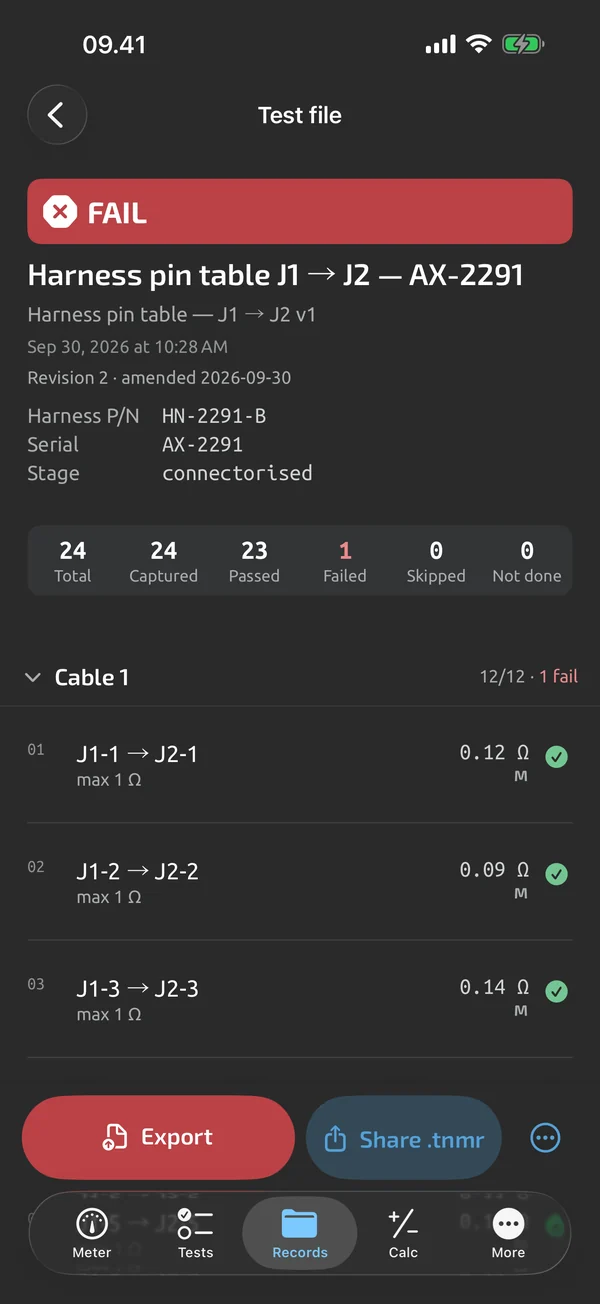
A finished test file can be amended: title, metadata, notes, annotations, and redo of steps Pro. Amending creates revision n+1 and keeps all earlier revisions. Exports print, for example, "Revision 2 · amended 2026-10-01 by …" and mark amended steps. Amend works in the app and in the web app, which is part of Cloud Cloud.
Find test files again
Records → Test files lists every run with its result badge, counts, template and version, title, key metadata and date. You can filter by template, result, status, date and instrument, and search titles, metadata values and notes. The viewer shows a grouped step table with value, limits, result, source and attempts, plus annotations and revisions. A test file is your record, not a certification. For the reports, see Reports and export.
What it does and doesn't do (yet)
| What it does | Plan |
|---|---|
| The summary shows PASS, FAIL or INCOMPLETE; finish, abandon, or go back and redo a failed step. | Free |
| A library of all your test files, with search, filters and a viewer. | Free |
| Start the next unit of a batch with the serial number advanced, or amend a finished test file as a new revision. | Pro |
Pro is a one-time purchase and Cloud is a subscription, both in the app. See what is Free, Pro and Cloud.
Not yet, or not planned
- A test file is your record, not a certification.
- No real-time shared editing or comments.
Questions
What does INCOMPLETE mean?
No step failed, but required steps are not done.
Can I change a finished test file?
With Pro you can amend it, and each amendment becomes revision n+1; earlier revisions are kept and exports show which revision they are.
Does the serial number advance?
Yes. Start next unit, a Pro feature, copies the metadata and advances fields set to auto-increment.
Coming to iPhone and Android.
iOS and Android, beta this winter.


Questions or a meter to suggest? Mail support@testnmeasure.app.
No ad networks, no sign-up.