Guide · updated 3 November 2026 Free Pro
What a TestNMeasure test file is, and what it is not
Your technicians may ask to use a phone app to record electrical checks. This sheet says what the file from that app is, so you can decide how it fits your own procedures. It is short on purpose. A test file is your record, not a certification.
iOS and Android, beta this winter.
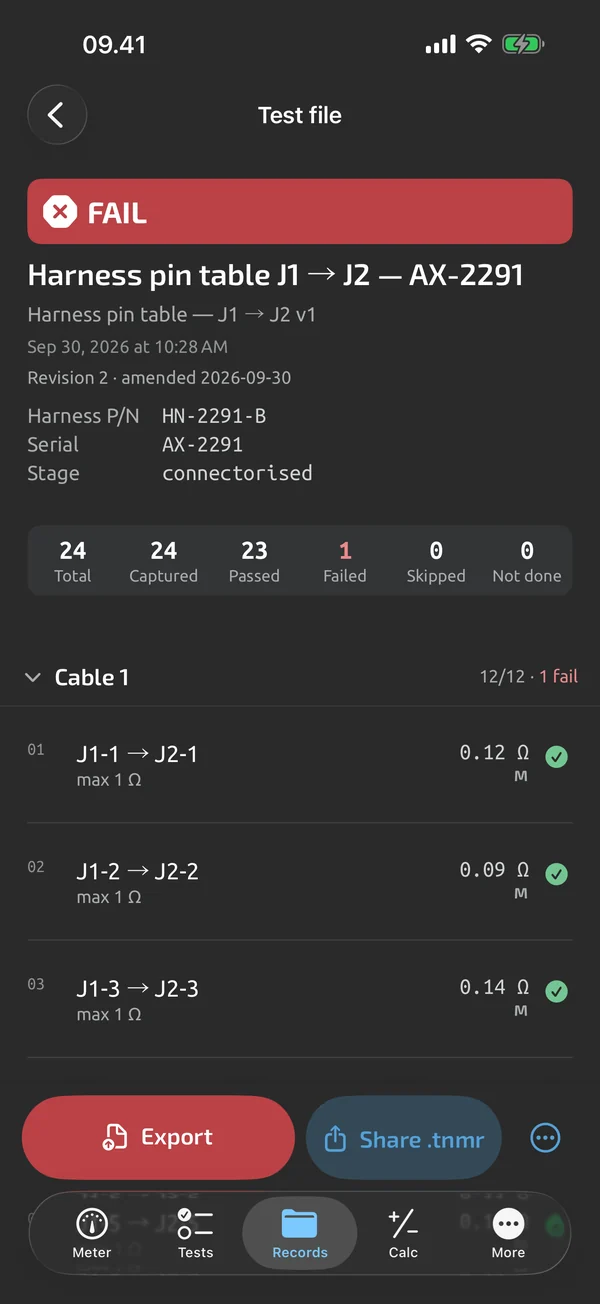
What the file holds
- The steps, in order, each with its label, the value and unit exactly as stored, the limit, and the result: PASS, FAIL or INCOMPLETE for the whole run Pro.
- Typed values. A value entered by hand, for example from a bond tester or a megohm tester, is marked manual.
- Fields your shop adds. Run fields such as tail number, task card, part number and serial number, in the order of the template.
- The meter. Every reading is tied to the meter that took it. The PDF lists the meter's name, model, firmware and serial number.
- Attempts. A step that was redone or rechecked keeps its earlier attempts, and the PDF can include the attempt history.
- Notes and photos added to a step.
- Revisions. A finished file can be amended as a new revision. The earlier revision is kept, and the PDF shows the revision line Pro. Revisions are a Pro feature.
- Your header. The company name, the technician's name and a logo, in the header of the Excel and PDF reports Pro.
The file comes as a PDF, an Excel report or CSV. A complete test file, with its photos, can also be shared as a package that anyone can open in the app without an account.
What it is not
- Not a maintenance entry. Rules such as 14 CFR 43.9 in the US and EASA Part-145 point 145.A.55 ask for a description or a data reference, a date and a signature. They do not ask for measured values. The test file is the record your work order points to.
- Not a certification. The app reads what the meter measures and compares it with limits that you set. The starter templates and the guides show example limits; your manual decides.
- No signature or tamper seal yet. A report fingerprint and a signed timestamp are coming. Until then, the file does not prove it has not been changed after export.
- No teams, roles or reviewers. The app has no second-signer step and no shared libraries. This is not planned for v1.
- No connectors. There are no connectors to maintenance or ERP systems. Attach the exported file to the work order by hand.
Who signs
Your own signature process. The PDF ends with the technician's name and a blank signature and date line. Print it, sign it or attach it as your procedure says. Your quality system decides what is signed, by whom, and where the signed copy is kept. The app supports your process; it does not replace it.
The meter is the tool
Calibration stays with your tool control. The app does not calibrate a meter and does not check one. It reads what your meter measures and does not change the meter's accuracy. Your meter, calibrated by you.
Which meter took the readings is on the record. The calibration due date is not printed on the report in the current version, so keep it in your tool-control system, or add it as a run field and type it in.
Device policy, in short
This is copied from the privacy policy, which is the full text.
You don't need an account. Every free feature works without one.
Your measurements stay on your phone unless you use Cloud sync. A free account backs up only your settings and templates.
On servers rented from Hetzner in the EU (data centres in Germany or Finland). Data is encrypted in transit and at rest, and each account's data is kept separate from every other account's.
See the privacy page for what the apps send and where it is stored.
In plain words: the app works offline and needs no account to measure. Cloud sync is optional, and the data it syncs is held on servers in the EU. Whether a phone is allowed on your floor is your shop's policy.
What the app does here, and what it doesn't
| What it does | Plan |
|---|---|
| Keeps a list of your instruments with names you choose, so every reading is tied to the meter that took it. | Free |
| Type the reading from any instrument; typed values are marked as manual. | Free |
| Set limits per step: range, min, max, equals, tolerance or expected open. Bounds are inclusive. | Pro |
| Start a run with a title and your own metadata fields, such as a serial number that counts up. | Free |
| Redo, skip, go back and recheck steps; earlier attempts are kept. | Free |
| Add a note, photos and a voice note to any step. | Free |
| Export log sessions and test files as CSV, free. | Free |
| An Excel test report with real numeric cells and PASS and FAIL cells. | Free |
| A PDF test report with header, result, step table, notes, photos and a signature block. | Free |
| Share a complete test file, with its attachments, as a .tnmr package anyone can open without an account. | Free |
| Company name, technician and logo in the headers of Excel and PDF reports. | Pro |
| Start the next unit of a batch with the serial number advanced, or amend a finished test file as a new revision. | Pro |
Pro is a one-time purchase and Cloud is a subscription, both in the app. See what is Free, Pro and Cloud.
Not yet, or not planned
- A test file is your record, not a certification.
- Report fingerprint and signed timestamp are coming.
- No teams, shared libraries or reviewer sign-off; not planned for v1.
- No CMMS/ERP connectors.
- Teams, roles and seats are not planned for v1.
Questions
Can we use the file as a maintenance record?
That is your quality system's decision. The file is the record your work order points to. The maintenance entry, with its description or data reference, date and signature, is made the way your own rules require.
Does the file show the meter's calibration status?
Not in the current version. It shows which meter took each reading. Keep calibration records in your tool control, and add a run field if you want the due date on the file.
Can a second person review and sign?
Not in the app. There are no reviewer roles. Review the exported file in your own process, outside the app.
Coming to iPhone and Android.
iOS and Android, beta this winter.


Questions or a meter to suggest? Mail support@testnmeasure.app.
No ad networks, no sign-up.