Guide · updated 3 November 2026 Free Pro
Wire Harness Continuity Test With a Bluetooth Multimeter
A continuity test answers one question per wire: does this pin connect to that pin, and is the resistance low enough? On a harness with 50 or more pins you ask it hundreds of times, and write each answer down. With a Bluetooth multimeter and your phone, the app reads the meter, saves each steady reading, shows PASS or FAIL, and keeps the whole run as one record.
iOS and Android, beta this winter.
What you need
- A Bluetooth multimeter the app reads live, such as the OWON OW18B, set to ohms. The app treats the meter's continuity mode as a different function from ohms, so a step that expects ohms holds back the capture and warns you.
- Test leads or probes that reach the contacts without bending them.
- A pin table for the harness: the list of which pin goes to which.
- No meter yet? The demo meter is a simulated meter with a 50-pin demo harness, so you can try a run first.
Pin to pin: the steps
- Isolate the harness from power. Check the connectors are clean and undamaged.
- Short the two probes together and press REL, so the lead resistance is taken off every reading.
- Start a run from a harness template. Two starter templates ship with the app: ST-1, a 20-pin continuity check, and ST-2, a 12-conductor harness check with a stage field.
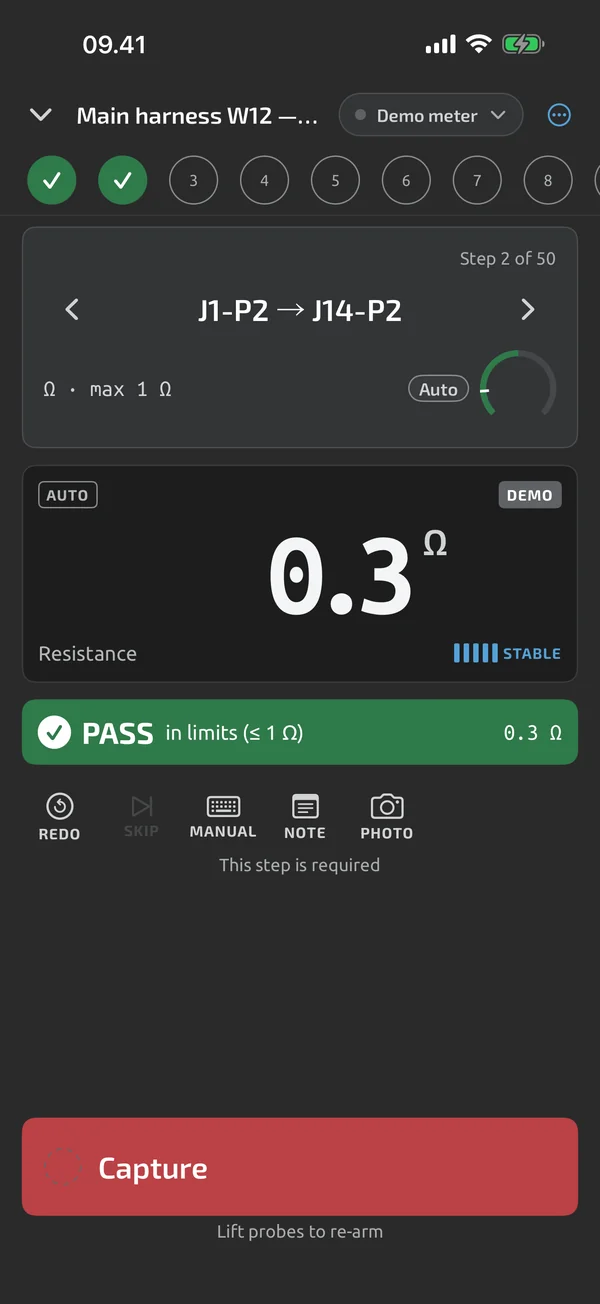
- Touch the probes to the first pair of pins. When the reading is steady, the app captures it, shows PASS or FAIL against the limit, and moves to the next step.
- Lift the probe or change the reading clearly before the next capture. That stops the same value from being saved twice.
- If a pin fails or you slip, go back and recheck it. Redo, skip and go back are all there, and earlier attempts are kept.
- At the end, the summary shows PASS, FAIL or INCOMPLETE, with the failed pins listed. Export the run.
Forward, back and recheck
A wire can pass one way and fail the other, for example when a contact is only just touching. Test each conductor forward, then back, and recheck it if the two disagree. Make the pin table hold both directions as separate steps, or let a failed step send you back to it. The app keeps every attempt, so the record shows what you did.
Three stages
Check a harness at each stage, and keep the stage in the record:
- After lead-out, when the wires are cut, crimped and numbered.
- After the connectors go on, when every pin is in its connector.
- Installed, before power-on.
Add a run field called Stage, and fill it in at the start of each run. Three runs give three files, so each stage has its own record. ST-2 already asks for the build stage.
A pin table of your own
Type the steps in the template builder (Pro), group them by cable, or import the pin table (how to import it from a connector drawing). The import takes pasted text, a CSV or TSV file or an Excel sheet, and you map its columns to step fields Pro. Set a maximum resistance on the steps, and the step shows PASS or FAIL against it. Bounds are inclusive.
Aircraft wiring
For aircraft harnesses the limit per conductor depends on the wire gauge and the length. The FAA advisory circular AC 43.13-1B lists the maximum resistance per 1,000 feet for tin-plated copper conductors at 20 °C (Table 11-9, para 11-66 d(2)). The circular is guidance. Your drawing and the maintenance manual win. The values below are example; set your own limits.
| Wire (tin-plated) | Table 11-9, Ω per 1,000 ft | For a 10 ft run |
|---|---|---|
| 22 AWG | 16.20 | 0.162 Ω |
| 20 AWG | 9.88 | 0.0988 Ω |
| 18 AWG | 6.23 | 0.0623 Ω |
| 16 AWG | 4.81 | 0.0481 Ω |
The last column is computed: 16.20 Ω per 1,000 ft times 10 ft is 0.162 Ω. Add the contact allowance your drawing asks for. Put gauge and length in as typed value steps, and set the limit on each pin step Pro.
Some points for aircraft work:
- Zero the leads first. A limit like 0.162 Ω is small next to the resistance of a pair of test leads, and your meter's resolution on its low range may be too coarse for it. Check its data sheet. Press REL with the probes shorted, and write the lead resistance in a typed step.
- Probe at the test point. Do not pierce the insulation. Use the connector contact or a test point.
- Shell isolation. For each pin to the connector shell, set the step to expect open. The step passes on OL Pro.
- Insulation resistance needs a megohm tester, not a multimeter. Read it on that tester and type the value into a step; it is marked manual.
- Limits and sign-off. A test file is your record, not a certification. See aircraft electrical test records for what the file is and what it is not.
An example aircraft step list
An example step list for an aircraft harness, to build with the template builder or follow on paper (it is not an included starter template):
| # | Step | Kind | Example limit |
|---|---|---|---|
| 1 | Harness isolated from power, connectors clean and undamaged | check | Pass, Fail or N/A |
| 2 | Wire gauge and plating | value, typed | none |
| 3 | Run length in feet | value, typed | none |
| 4 | Each conductor, J1 pin to J2 pin | measure, Ω | max by Table 11-9 for gauge and length |
| 5 | Each J1 pin to shell | measure, Ω | expected open |
| 6 | Backshell and strain relief fitted | check | Pass, Fail or N/A |
The report
The PDF lists each step with its value, unit, limit and result, with the notes and photos you added. The Excel report has real numeric cells and PASS and FAIL cells. Pro adds your company name and the technician's name to the header Pro. CSV is there for any other tool. The app does not connect to ERP or maintenance systems; you attach the exported file by hand.
What the app does here, and what it doesn't
| What it does | Plan |
|---|---|
| A simulated meter lets you try the whole app without hardware; it is labelled DEMO everywhere. | Free |
| Type the reading from any instrument; typed values are marked as manual. | Free |
| REL shows the difference from a stored reference, for example to null out test-lead resistance. | Free |
| Group steps under headers to organise long pin tables. | Pro |
| Import a pin table from pasted text, a CSV or TSV file or an Excel sheet, and map its columns to step fields. | Pro |
| One step can measure many identical points, 2 to 500 channels, each with its own result. | Pro |
| Set limits per step: range, min, max, equals, tolerance or expected open. Bounds are inclusive. | Pro |
| Start a run with a title and your own metadata fields, such as a serial number that counts up. | Free |
| Capture a step, see PASS or FAIL, and the run moves on to the next step. | Free |
| Saves a steady reading with no tap, and needs a probe lift or a clear change before the next capture. | Free |
| Redo, skip, go back and recheck steps; earlier attempts are kept. | Free |
| Type a value, or give a Pass, Fail or N/A verdict, when a step needs it. | Free |
| Add a note, photos and a voice note to any step. | Free |
| Warns when the meter is on a different function than the step expects, and holds back auto-capture. | Free |
| Export log sessions and test files as CSV, free. | Free |
| An Excel test report with real numeric cells and PASS and FAIL cells. | Free |
| A PDF test report with header, result, step table, notes, photos and a signature block. | Free |
| Company name, technician and logo in the headers of Excel and PDF reports. | Pro |
Pro is a one-time purchase and Cloud is a subscription, both in the app. See what is Free, Pro and Cloud.
Not yet, or not planned
- A test file is your record, not a certification.
- Starter templates are examples (beta-v1, revisable); you set the limits for your equipment.
- Units compare strictly: continuity is not Ω, diode is not V.
- No CMMS/ERP connectors.
Questions
How do I test continuity with a multimeter?
Set the meter to ohms or continuity, short the probes, and note the reading; that is the lead resistance. Touch the probes to the two ends of the wire. A low resistance means the path is complete, and OL means it is open. In the app, the same reading is captured, compared with your limit and saved.
Can the app test a harness with 100 pins or more?
Yes. One step can measure many identical points, from 2 to 500, each with its own result. Import the pin table from a spreadsheet instead of typing it.
Why does the app want ohms and not continuity mode?
Units compare strictly: continuity is not ohms. A step that expects ohms holds back the capture while the meter is on another function, and warns you.
Does the pin table import need Pro?
Yes. Pin-table import and the template builder are Pro. Running a starter template, auto-capture, the PDF and Excel reports are free.
Coming to iPhone and Android.
iOS and Android, beta this winter.


Questions or a meter to suggest? Mail support@testnmeasure.app.
No ad networks, no sign-up.