Brand
OWON multimeters in TestNMeasure
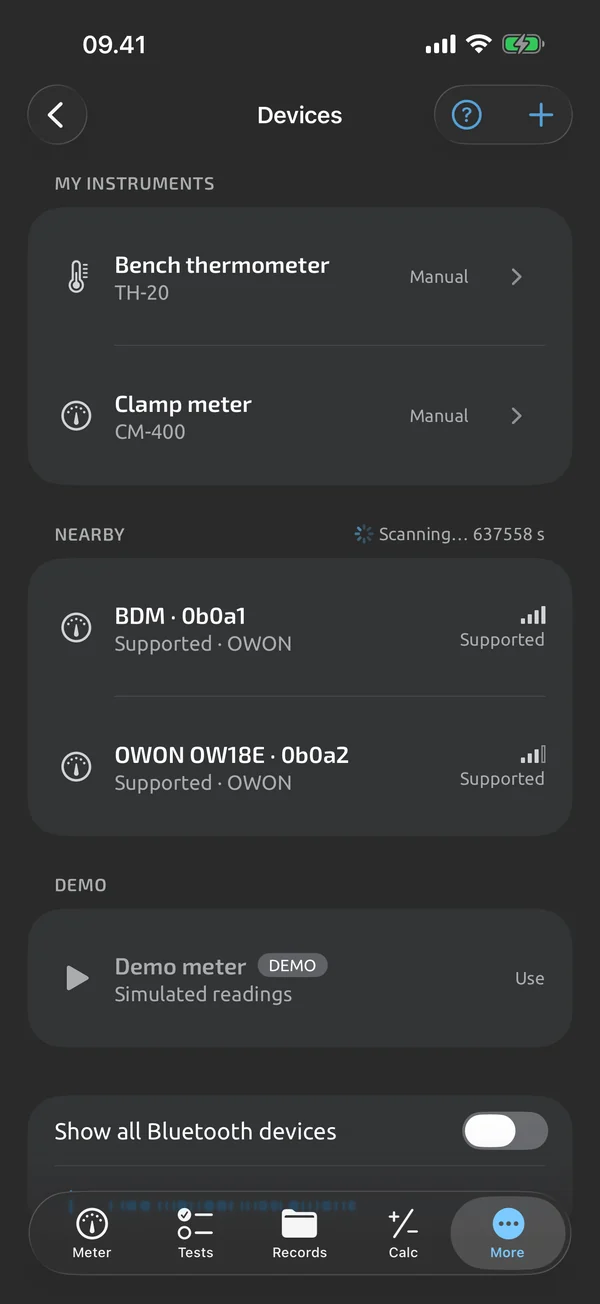
OWON makes the BDM family of handheld multimeters with Bluetooth LE. TestNMeasure reads them live on the phone: the meter's value and unit large on screen, with graph, hold, logging and guided test sequences on top.
iOS and Android, beta this winter.
OWON models
| Meter | Connection | Status | Notes |
|---|---|---|---|
| OWON OW18B | Bluetooth LE | Verified on hardware | 3 5/6 digits, True RMS. Live readout, flags, battery. |
| OWON OW18E | Bluetooth LE | Drafted, not yet verified | 4½ digits, True RMS. Gets its page after its own hardware test. |
Verified: live Bluetooth readings were checked on hardware. Drafted: written up, waiting for its own hardware test. All brands · All meters
What the meter sends
In plain words, a BDM meter sends the reading and its unit, over Bluetooth LE, a few times a second. Alongside it come status flags: HOLD, REL, MIN and MAX when the meter is in those modes, and a low-battery flag. The app shows what the meter sends and does not change how it measures. When the meter reports an overload, the app shows OL or UL, never a number.
The meter appears in the app's scan list with a name that starts with BDM. Tap it to connect; the app reconnects to your last meter on launch and after drops, and shows the meter's battery, model and firmware where the meter reports them.
What is not available
The app does not press the meter's keys from the phone, and it cannot yet download the meter's own memory. Both are planned, and neither is claimed until it has been verified on the meter.
Other OWON models
Other BDM meters use the same protocol and may work, but only the models in the table are claimed. If you have another one, mail its model to support@testnmeasure.app.
What it does and doesn't do (yet)
| What it does | Plan |
|---|---|
| Finds supported Bluetooth meters nearby and lists them, with a clear path when Bluetooth or its permission is missing. | Free |
| Tap a result to connect; the meter becomes the active instrument and live readings start. | Free |
| Reconnects to your last meter on launch and after drops, and always shows the connection state. | Free |
| Keeps a list of your instruments with names you choose, so every reading is tied to the meter that took it. | Free |
| A simulated meter lets you try the whole app without hardware; it is labelled DEMO everywhere. | Free |
| Type the reading from any instrument; typed values are marked as manual. | Free |
| Shows the meter's battery, model and firmware where the meter reports them, and warns when its battery is low. | Free |
| A large readout that shows which digits have settled; OL and UL are shown as OL and UL, never as a number. | Free |
| Swipe the readout to a live graph with min and max lines, pan and zoom. | Free |
| Hold freezes the displayed reading and statistics in the app, independent of the meter's own HOLD. | Free |
| Shows the running minimum, maximum and average since the last reset, with the sample count. | Free |
| Shows rolling averages over the last 5, 30 and 60 seconds. | Free |
| REL shows the difference from a stored reference, for example to null out test-lead resistance. | Free |
| Five stability bars show when a reading is steady. | Free |
| A landscape layout for the meter and run screens. | Free |
| Keeps the screen on while you measure, run a test or record. | Free |
| One tap saves the current reading, with an Undo. | Free |
| Log sessions hold captures and time-series recordings, and recording continues with the screen locked. | Free |
| Add a text note and a short label to any capture. | Free |
| Attach up to 5 photos to a capture. | Free |
| Record a voice note of up to 2 minutes on a capture. | Free |
| Scale readings with a factor and an offset, for clamp adapters, shunts and probe dividers; the raw reading is kept. | Free |
| Search and filter your history; deleted items stay in Recently deleted for 30 days. | Free |
| Review a session as a full graph with pan and zoom, statistics and its captures. | Free |
| Auto-record saves a capture when the reading becomes stable. | Free |
Not yet, or not planned
- One live Bluetooth meter at a time; two meters live at once is not planned for v1.
- Can't press the meter's buttons from the phone yet.
- Can't download the meter's own memory yet.
Questions
Which OWON meters work with TestNMeasure?
The OW18B is verified: live readings were checked against the meter's display. The OW18E is written up and waits for its own hardware test, so it has no page yet.
Do I need an OWON meter to try the app?
No. The demo meter is simulated and labelled DEMO, and any other instrument can be typed in by hand.
Can I connect two OWON meters at once?
No. One live Bluetooth meter is connected at a time. Your instrument list remembers each meter by name.
OWON is a trademark of its owner; TestNMeasure is not affiliated with or endorsed by OWON.
Coming to iPhone and Android.
iOS and Android, beta this winter.


Questions or a meter to suggest? Mail support@testnmeasure.app.
No ad networks, no sign-up.