Test sequences Free Pro
Every point, in order: guided test sequences with pass/fail
Define the points of a procedure once, then run it: each reading is captured with one tap or hands-free, checked against its limits at capture, and kept in a test file Pro. Reports follow from the test file.
iOS and Android, beta this winter.
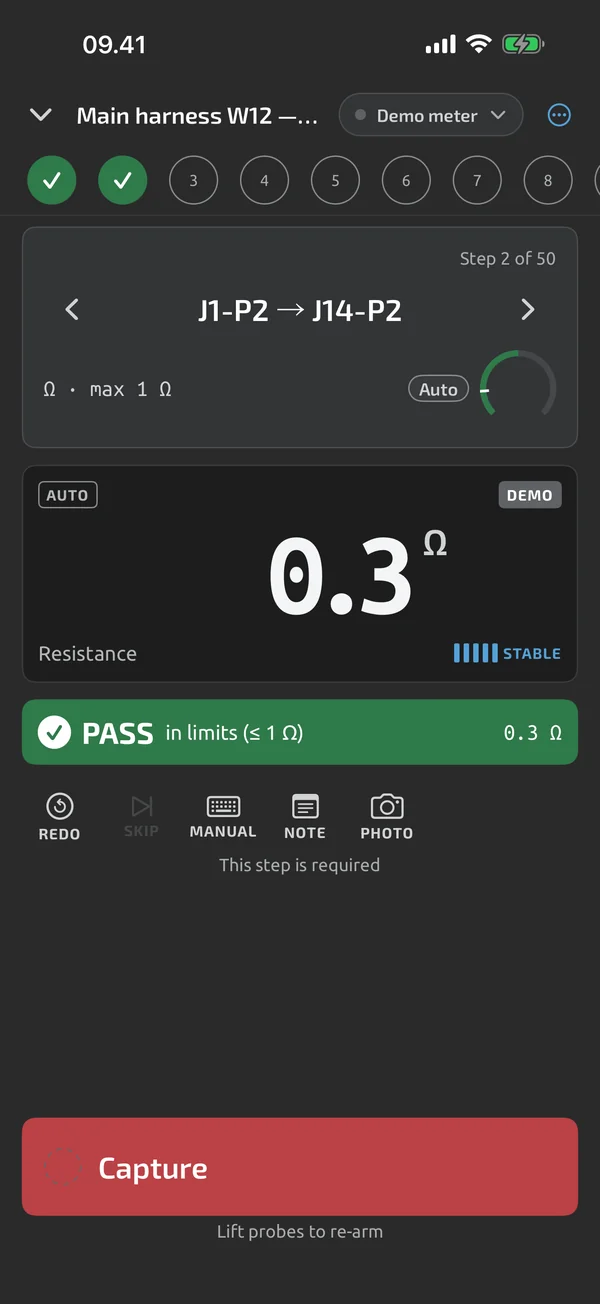
Build the template once
A template holds the steps, groups, limits and the metadata you want to record on every run, such as a serial number Pro. Steps can be measurements, Pass/Fail/N/A checks, typed values or calculated values. One step can be measured across 2–500 identical channels, and a template holds up to 2,000 steps, counting channels. Building templates is part of Pro; Pro is an in-app upgrade, see Pricing. See Template builder.
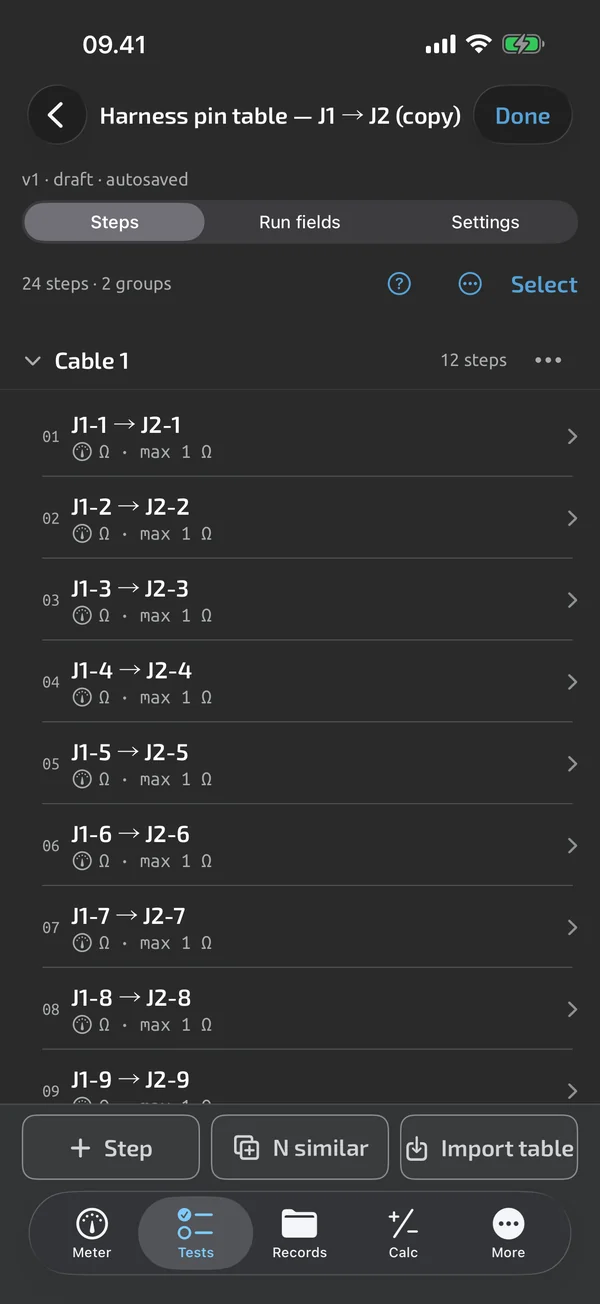
Import a pin table
Paste a pin table or open a CSV, TSV, TXT or Excel file, map the columns and preview the first 20 steps. Up to 2,000 rows come in as one template Pro. See Pin-table import.
Pass or fail, at capture
Every step can carry limits: a range, a minimum, a maximum, a nominal with a tolerance, or an expected open circuit. The result badge appears the moment the reading is captured, with the reason on the step card Pro. See Pass/fail limits.
Run it point by point
A run steps through the points in order, with a rail of every position and a Capture & next button. After a short result dwell, 600 ms by default, it advances to the next pending point Pro. Capture can also fire by itself when the reading is steady. You can redo, skip, go back, type a value or add a note, photo or voice note. A run survives a crash or a dead battery. The test-run features are Pro, and you can try them on your first test runs; see Guided runs and Auto-capture.
Finish, then share
The summary shows PASS, FAIL or INCOMPLETE, counts per group, and the failed and not-done steps to go back to Pro. Start the next unit with the metadata carried over, or amend a finished test file as a new revision. Templates (.tnmt) and complete test files (.tnmr) are shared as files, and the apps open them for free. The nine starter templates are free. See Summary, next unit and amend, Starter templates and Share templates and test files.
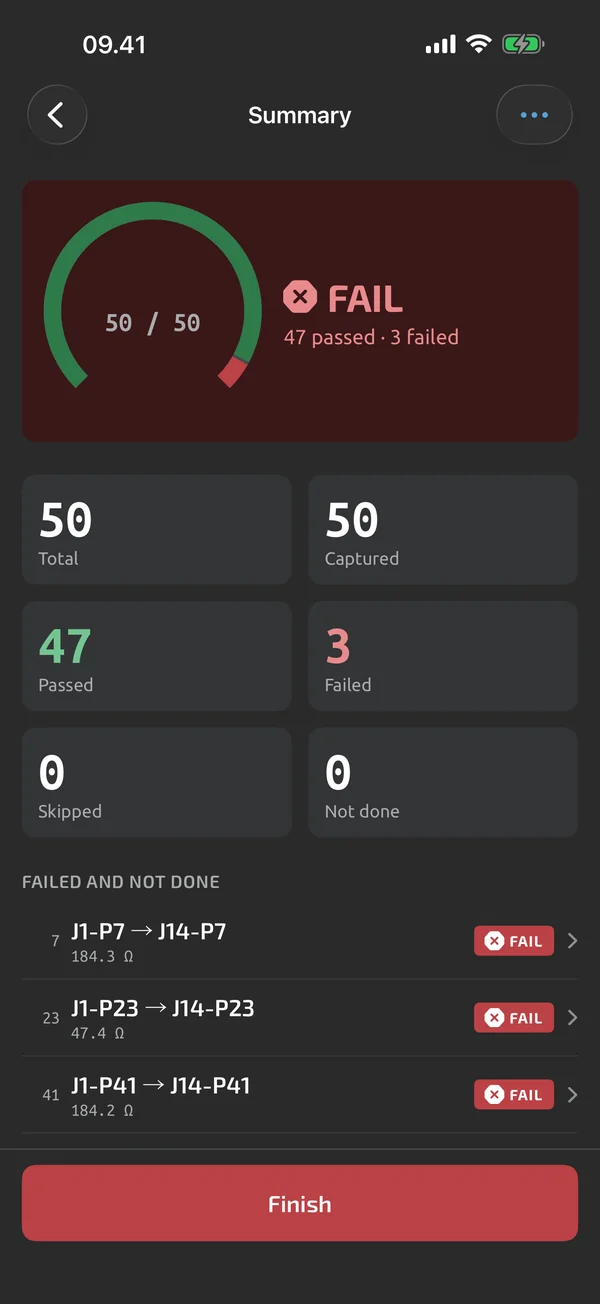
From the test file to a report
A finished run is a test file you can open any time in the Records tab. CSV export is free; Excel and PDF reports are Pro. See Reports and export. Formulas can compute values inside a run; see Calculator. To try a template without a meter, see Meters.
In Test sequences
Template builder
Steps, groups, multi-channel steps and frozen versions, saved once and reused on every run.
Pin-table import
Paste or open a pin table, map the columns, preview 20 steps and import up to 2,000 rows as a template.
Pass/fail limits
Range, min, max, tolerance and expected-open limits, with inclusive bounds, OL/UL rules and a stated reason.
Guided runs
Capture and advance through the points, redo or skip, type values, annotate, and resume after a crash.
Auto-capture
Capture fires on a steady reading, needs a probe lift before the next one, and can follow the meter's HOLD.
Summary and amend
A PASS, FAIL or INCOMPLETE summary, next unit with the serial advanced, and amended revisions that keep the history.
Starter templates
Nine bundled templates for continuity, harnesses, batteries, boards, motors, outlets and solar panels.
Share templates and files
Send a procedure as .tnmt or a complete test file as .tnmr; the apps import both for free.
What it does and doesn't do (yet)
| What it does | Plan |
|---|---|
| A library of your templates, runs in progress and starter templates. | Free |
| Build test templates with steps, groups, limits and run metadata fields. | Pro |
| Four step types: measure, check, value and derived. | Pro |
| Group steps under headers to organise long pin tables. | Pro |
| Import a pin table from pasted text, a CSV or TSV file or an Excel sheet, and map its columns to step fields. | Pro |
| One step can measure many identical points, 2 to 500 channels, each with its own result. | Pro |
| Set limits per step: range, min, max, equals, tolerance or expected open. Bounds are inclusive. | Pro |
| Editing a template that has test files creates a new version; existing files keep theirs. | Pro |
| Starter templates for common tests are included in the app. | Free |
| Start a run with a title and your own metadata fields, such as a serial number that counts up. | ProTry it on your first test runs. |
| Capture a step, see PASS or FAIL, and the run moves on to the next step. | ProTry it on your first test runs. |
| Saves a steady reading with no tap, and needs a probe lift or a clear change before the next capture. | ProTry it on your first test runs. |
| Redo, skip, go back and recheck steps; earlier attempts are kept. | ProTry it on your first test runs. |
| Type a value, or give a Pass, Fail or N/A verdict, when a step needs it. | ProTry it on your first test runs. |
| Add a note, photos and a voice note to any step. | ProTry it on your first test runs. |
| A run survives a crash or a dead battery; you resume where you left off. | ProTry it on your first test runs. |
| The summary shows PASS, FAIL or INCOMPLETE; start the next unit, or amend a finished test file as a new revision. | ProTry it on your first test runs. |
| Share a template as a .tnmt file that anyone can open in the app. | Free |
| Warns when the meter is on a different function than the step expects, and holds back auto-capture. | ProTry it on your first test runs. |
| A library of all your test files, with search, filters and a viewer. | Free |
Pro is an in-app upgrade. See what is Free and what is Pro.
Not yet, or not planned
- No teams, shared libraries or reviewer sign-off; not planned for v1.
- No automatic template creation from an arbitrary spreadsheet; use the pin-table import.
- Template steps don't nest groups.
- No voice commands ("next", "redo").
- No watch or hardware-button remote capture.
- A test file is your record, not a certification.
- No real-time shared editing or comments.
Questions
Do I need Pro to try a test run?
No. Pro test-run features can be used on your first test runs, and abandoned runs don't count. Pro is an in-app upgrade; see Pricing.
Can a colleague run my template without Pro?
They can open a .tnmt file in the app for free, look through every step and start a run on their first test runs. Running beyond that, and creating or editing templates, needs Pro.
Is a test file a certificate?
No. A test file is your record, not a certification. It holds the readings, limits, results and notes you captured.
Does it work offline?
Yes. Templates, test runs and every export work without a network. You only need a connection to sign in, sync, use the web app or make a purchase.
Coming to iPhone and Android.
iOS and Android, beta this winter.


Questions or a meter to suggest? Mail support@testnmeasure.app.
No ad networks, no sign-up.