Test sequences Pro
Pass/fail limits, checked at capture
Every captured reading is checked against the limits of its step, and the result says why. Limits are part of Pro; Pro is an in-app upgrade, see Pricing.
iOS and Android, beta this winter.
Limit types
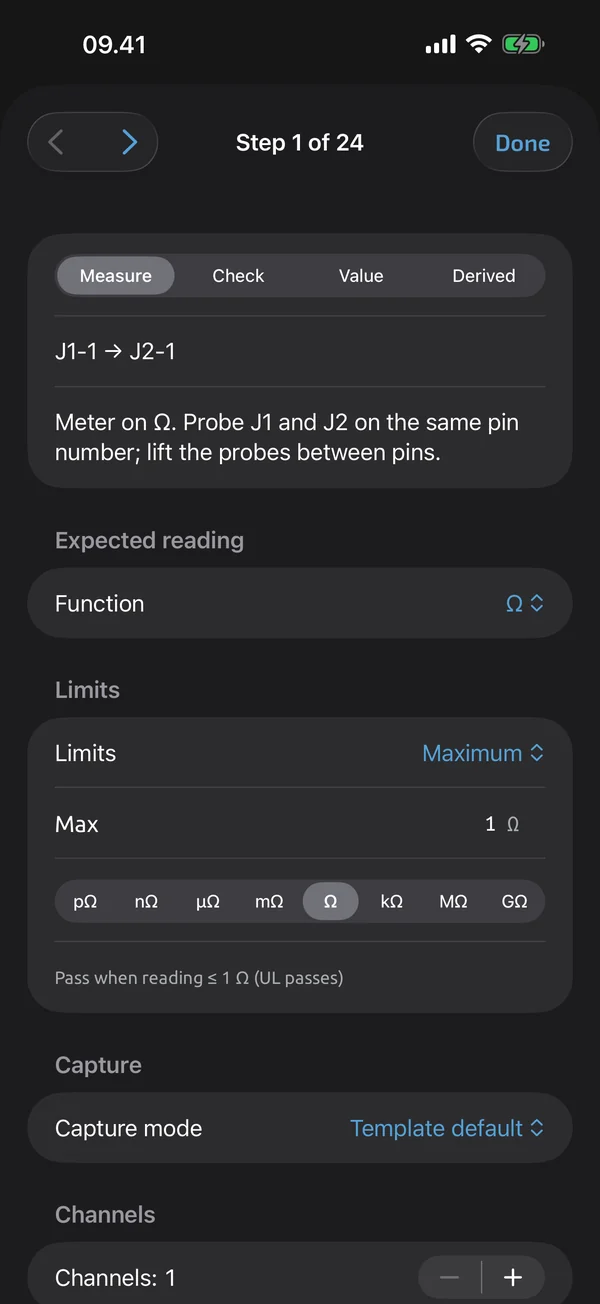
A step can use one of these limits:
- range: minimum ≤ value ≤ maximum
- min: value ≥ minimum
- max: value ≤ maximum
- equals: the value equals the nominal at the reading's display precision
- tolerance in percent: the nominal ± p %
- tolerance absolute: the nominal ± a
- expect open: passes on OL, or on a value at or above an optional threshold
- none: no limits
You enter limits with a unit and prefix, for example ≤ 0.5 Ω or 11.4–12.6 V. Bounds are inclusive, and values are compared exactly after conversion to SI, with no floating point.
OL and UL
OL passes a min limit and an expect-open limit, and fails all others. UL passes a max limit and fails all others. A passing OL or UL keeps its reason on the result. With no limits, every reading, OL and UL included, is recorded as n/a with the reason no limits.
The reason is on the card
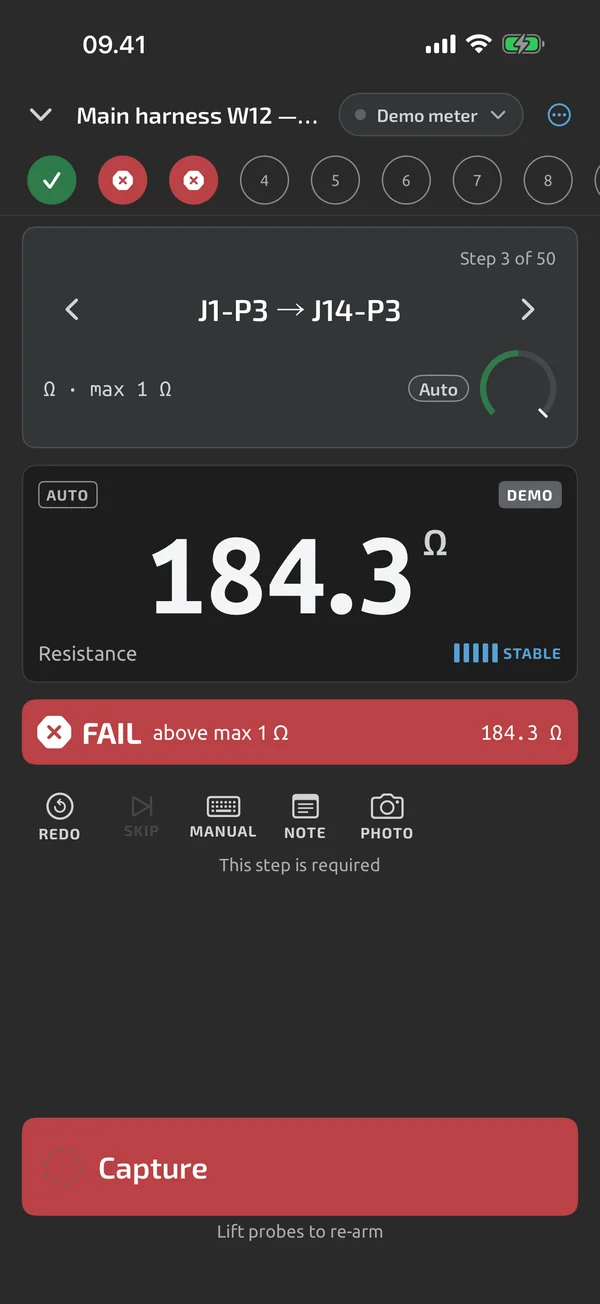
Each result stores a reason: in limits, below min, above max, out of tolerance, OL or UL accepted, unit mismatch, manual verdict, or no limits. The step card shows it, for example "FAIL · above max 0.5 Ω".
Wrong function or unit
A reading whose function or unit differs from the step's expectation evaluates to fail with the reason unit mismatch. Units compare as strings: continuity is not Ω, and diode is not V. Only the prefix is normalised, so mV against V is not a mismatch. Before you capture, a banner says, for instance, "Meter on AC V — step expects DC V", once per step. Auto-capture is suspended while the meter is on the wrong function, and the button becomes Capture anyway, which records a fail with reason unit mismatch.
Fixed at capture
Limits are evaluated at capture, on redo and on amend. They are never re-evaluated when the template changes later, because a run keeps the template version it started on. For the report built from a finished run, see PDF reports.
What it does and doesn't do (yet)
| What it does | Plan |
|---|---|
| Set limits per step: range, min, max, equals, tolerance or expected open. Bounds are inclusive. | Pro |
| Warns when the meter is on a different function than the step expects, and holds back auto-capture. | ProTry it on your first test runs. |
Pro is an in-app upgrade. See what is Free and what is Pro.
Not yet, or not planned
- Units compare strictly: continuity is not Ω, diode is not V.
Questions
Are limits inclusive?
Yes. A range of 11.4–12.6 V passes 11.4 V and 12.6 V, and a maximum of 0.5 Ω passes 0.5 Ω.
How is OL treated?
OL passes a min limit and an expect-open limit and fails every other limit. UL passes a max limit and fails every other limit. With no limits, OL and UL are recorded as n/a.
What if the meter is on the wrong function?
A banner warns you before you capture, and auto-capture waits. If you capture anyway, the step fails with the reason unit mismatch.
Coming to iPhone and Android.
iOS and Android, beta this winter.


Questions or a meter to suggest? Mail support@testnmeasure.app.
No ad networks, no sign-up.