Test sequences Free Pro
Build a test template once, run it every time
Write a procedure as a template: its steps, groups, limits and the fields to record on every run. The builder is part of Pro; Pro is an in-app upgrade, see Pricing.
iOS and Android, beta this winter.
What a template holds
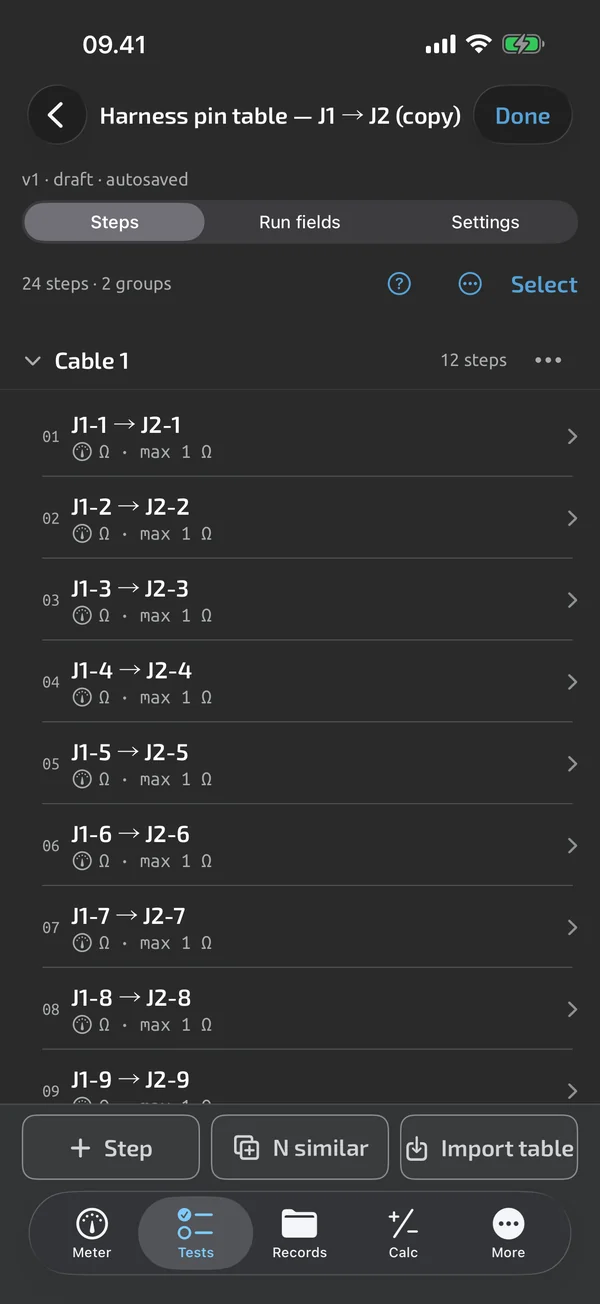
A template has a name of up to 120 characters, a description, run metadata fields (text, number, date or choice, optionally required, with auto-increment for serials), a default capture mode and a result dwell, 600 ms by default Pro. Create it from blank, from a starter template, from a duplicate or from a pin-table import. The builder saves every change as you make it. A template holds up to 2,000 steps, counting channels.
Four step types
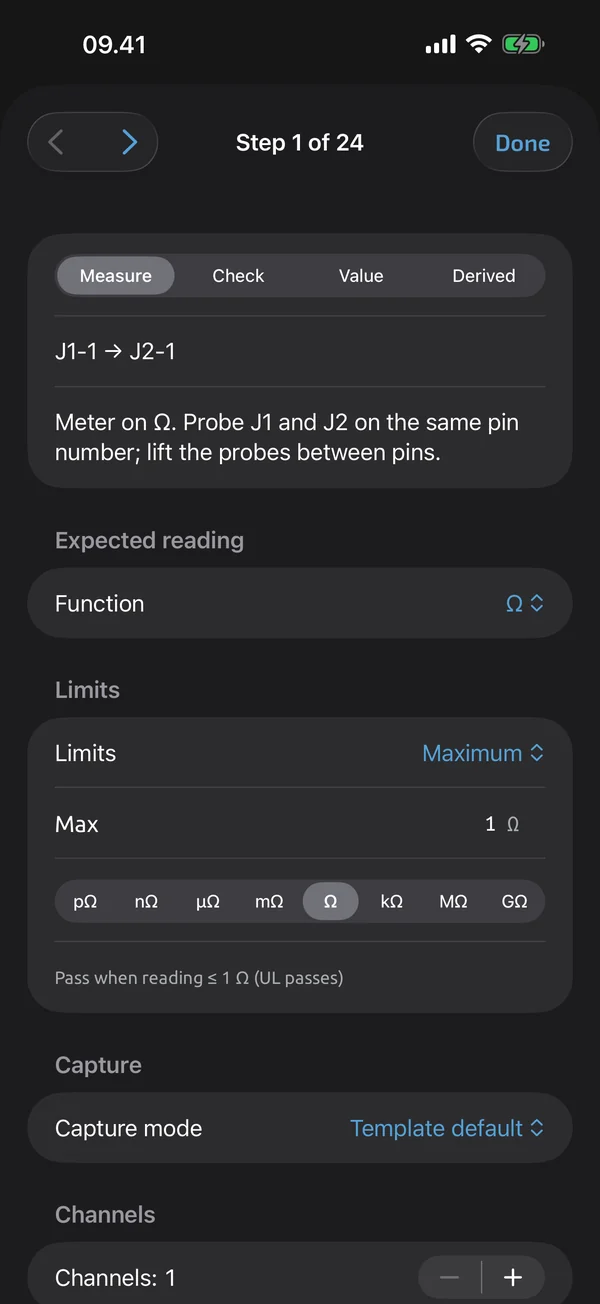
A measure step captures a reading, a check step takes your Pass, Fail or N/A verdict, a value step takes a typed number or text, and a derived step is computed from other steps Pro. Each step has a label of up to 120 characters, instructions of up to 500, an expected function and unit, limits and a capture mode. A step can be required, can allow skipping, and can require a photo.
Groups and multi-channel steps
Groups are headers that organise a long procedure, with a title of up to 120 characters. Steps belong to at most one group Pro. One step can be measured across 2–500 identical channels, shown as one row with a ×25 badge in the builder, and one result per channel in a run. Limits are shared by all channels. You can also add N similar steps at once, with N up to 500.
Versions that keep old files intact
A template version is frozen as soon as any run uses it. Editing a frozen version creates a new draft, version N+1, and existing test files keep the version they ran on Pro. Old versions are read-only and can be restored as a new version. Runs always start on the latest version. Formulas can compute values inside a template; see Calcs in templates.
What it does and doesn't do (yet)
| What it does | Plan |
|---|---|
| A library of your templates, runs in progress and starter templates. | Free |
| Build test templates with steps, groups, limits and run metadata fields. | Pro |
| Four step types: measure, check, value and derived. | Pro |
| Group steps under headers to organise long pin tables. | Pro |
| One step can measure many identical points, 2 to 500 channels, each with its own result. | Pro |
| Editing a template that has test files creates a new version; existing files keep theirs. | Pro |
Pro is an in-app upgrade. See what is Free and what is Pro.
Not yet, or not planned
- No automatic template creation from an arbitrary spreadsheet; use the pin-table import.
- Template steps don't nest groups.
- Custom export columns are coming.
Questions
Which step types are there?
Four: measure, check, value and derived. A measure step captures a reading from the meter or typed by hand, a check step is a Pass, Fail or N/A verdict, a value step is a typed number or text, and a derived step is calculated from other steps.
What happens to old test files when I edit a template?
Nothing. A version used by any run is frozen, so your edits become the next version and existing test files keep the version they ran on.
Can I build templates on a computer?
Yes. The web app has a spreadsheet-like grid with paste from Excel or Sheets, and building templates is part of Pro.
Coming to iPhone and Android.
iOS and Android, beta this winter.


Questions or a meter to suggest? Mail support@testnmeasure.app.
No ad networks, no sign-up.