Features
Everything TestNMeasure does, and what it doesn't do yet
TestNMeasure turns your phone into the display, logger and test recorder for your Bluetooth multimeter. This page lists every feature, and what it doesn't do yet.
iOS and Android, beta this winter.
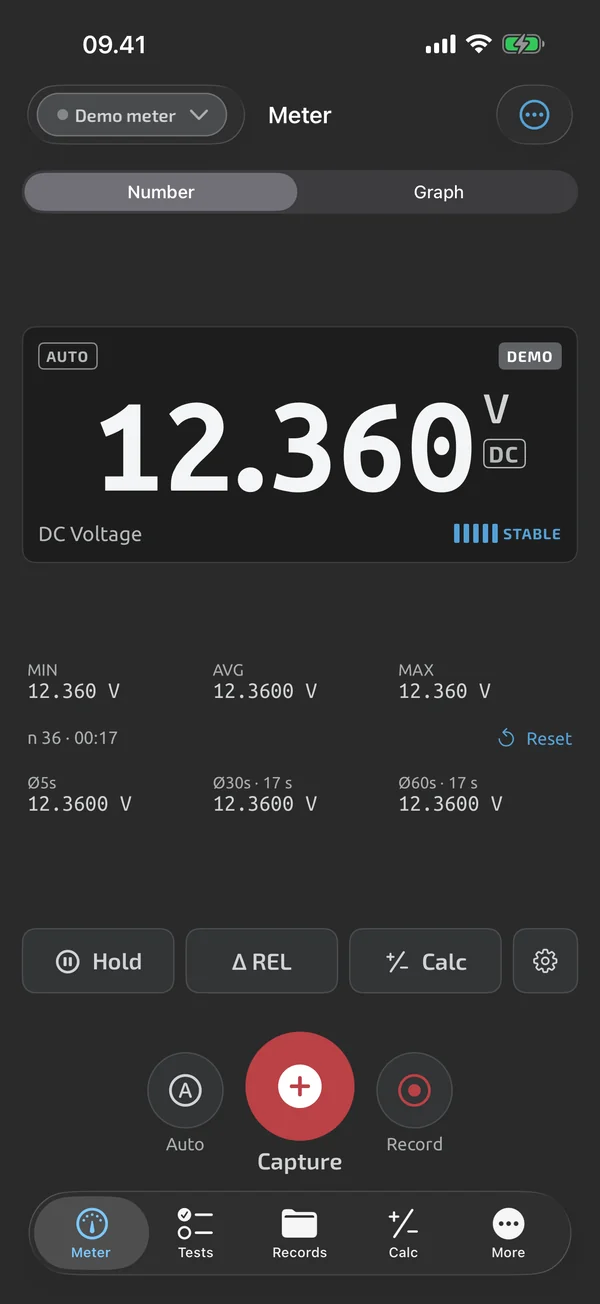
How the features are organised
The app has five areas: the live meter, logging, test sequences, the calculator, and reports. Each has its own page with the details, and each feature is marked Free or Pro.
The meter readout, logging, the calculator, CSV export and the demo meter are Free. Building templates, running guided tests and the Excel and PDF reports are Pro. Plans are on the pricing page.
Meters
Live Bluetooth support at launch is for the OWON OW18B and OW18E. Any other instrument can be used by typing its value into the app, and those readings are marked manual. The built-in demo meter lets you try the app without hardware and is labelled DEMO. See Meters for the list.
Live meter
A big readout that shows which digits have settled, plus graph, hold, REL, min/max/avg and scaling.
- Stable-digit readout A large number where settled digits are brighter than moving ones, plus stability bars, landscape and keep-awake.
- Live graph Swipe the readout to a live graph that auto-scrolls, zooms and shows the value under your finger.
- Hold, REL, min/max Freeze the reading, zero out lead resistance, and see min, max, average and rolling averages.
- Scaling Apply a factor and offset to live readings and captures, with the raw reading kept alongside.
Logging
Capture readings with one tap or record over time, with notes, photos and voice notes, then review them.
- Quick capture One tap saves the reading, with undo, then add a note, photos and a voice note.
- Time-series recording Record at an interval from every reading to 60 s, keep going with the screen locked, up to 1,000,000 samples.
- History and review Open any session as a graph with stats and captures, search your history, and restore deleted items.
Test sequences
Build a template once, run it point by point with pass/fail at capture, and finish with a summary and a test file.
- Template builder Steps, groups, multi-channel steps and frozen versions, saved once and reused on every run.
- Pin-table import Paste or open a pin table, map the columns, preview 20 steps and import up to 2,000 rows as a template.
- Pass/fail limits Range, min, max, tolerance and expected-open limits, with inclusive bounds, OL/UL rules and a stated reason.
- Guided runs Capture and advance through the points, redo or skip, type values, annotate, and resume after a crash.
- Auto-capture Capture fires on a steady reading, needs a probe lift before the next one, and can follow the meter's HOLD.
- Summary and amend A PASS, FAIL or INCOMPLETE summary, next unit with the serial advanced, and amended revisions that keep the history.
- Starter templates Nine bundled templates for continuity, harnesses, batteries, boards, motors, outlets and solar panels.
- Share templates and files Send a procedure as .tnmt or a complete test file as .tnmr; the apps import both for free.
Calculator
An EE calculator with presets that fills inputs from your live and captured readings; custom formulas and live derived values are Pro.
- EE calculator A keypad with SI prefix keys and a parallel operator, engineering-notation input, auto-prefix results and a 50-entry history.
- Preset formulas Form-style solvers with labelled inputs and units for Ohm's law, dividers, LED resistors, RC, dB, deviation and conversions.
- Cal Box A readings strip with the live reading and last 6 captures, plus an Ohm's law suggestion after two matching captures.
- Custom formulas Named formulas with bound inputs, a personal library, and up to 3 live calculations under the readout.
- Calcs in templates Derived steps that compute from other steps, and summary calculations printed in the report.
Reports and export
Free CSV export for everything, Excel and PDF reports with your company header in Pro, and shareable test files.
- CSV export Free CSV for log sessions and test files, with a BOM for Excel, a semicolon option and tab-delimited files.
- Excel reports xlsx test reports and log workbooks with numeric cells, PASS/FAIL cells with text, real timestamps and a Stats sheet.
- PDF reports A PDF for a finished test file with your company header, overall result, step table, photo appendix and clear FAIL rows.
Everything, Free and Pro
* Try it on your first test runs. Pro is an in-app upgrade.
Questions
Which features are free?
The live meter readout, graph, hold, REL, min/max/avg, logging with notes, photos and voice notes, scaling, the calculator and CSV export are Free. Building templates, running guided tests with pass/fail limits, and the Excel and PDF reports are Pro. Your first test runs are free to try. The pricing page has the plan details.
Does it work offline?
Yes. Connecting to the meter, capturing, templates, test runs, the calculator and every export work without a network. You only need a connection to sign in, sync, use the web app or make a purchase.
Do I need a meter to try it?
No. The built-in demo meter behaves like a real one, so you can try capture, test runs and exports first. See Meters.
Coming to iPhone and Android.
iOS and Android, beta this winter.


Questions or a meter to suggest? Mail support@testnmeasure.app.
No ad networks, no sign-up.