Live meter
A live multimeter readout you can trust
Your Bluetooth multimeter's reading, large on the phone, with the digits that have settled drawn brighter than the ones still moving. Swipe to a live graph, freeze the value, and watch the min, max and averages build up.
iOS and Android, beta this winter.
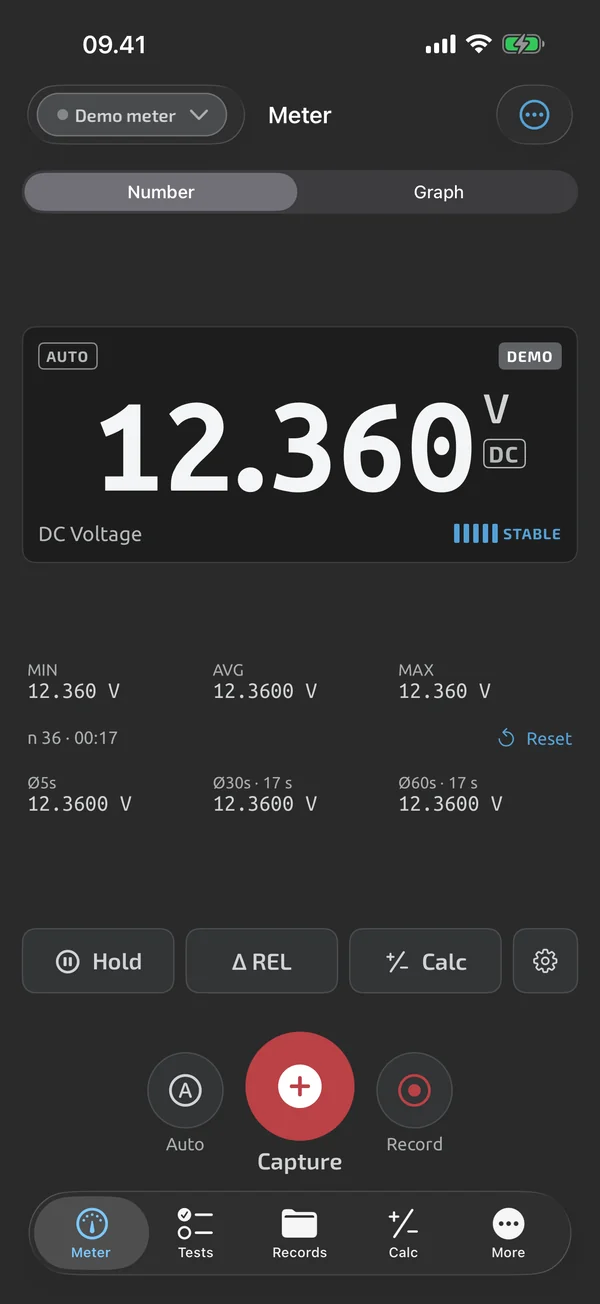
The readout
The number is big, and it keeps the same width whatever the value, so the layout doesn't jump. Each digit is drawn dimmer until it has been unchanged for at least 500 ms. OL and UL show as OL and UL, never as a number. Five stability bars light up as the reading steadies.
Graph, hold and statistics
Swipe the readout card to change from the number to a live graph. The default window is 30 s, and the last 10 minutes of readings are kept. Hold freezes the readout, the stats and the graph's auto-scroll in the app, while readings keep arriving underneath. Under the readout you get MIN, AVG and MAX, and rolling averages over the last 5 s, 30 s and 60 s. REL stores the current reading as a reference and shows the difference, for example to null out test-lead resistance.
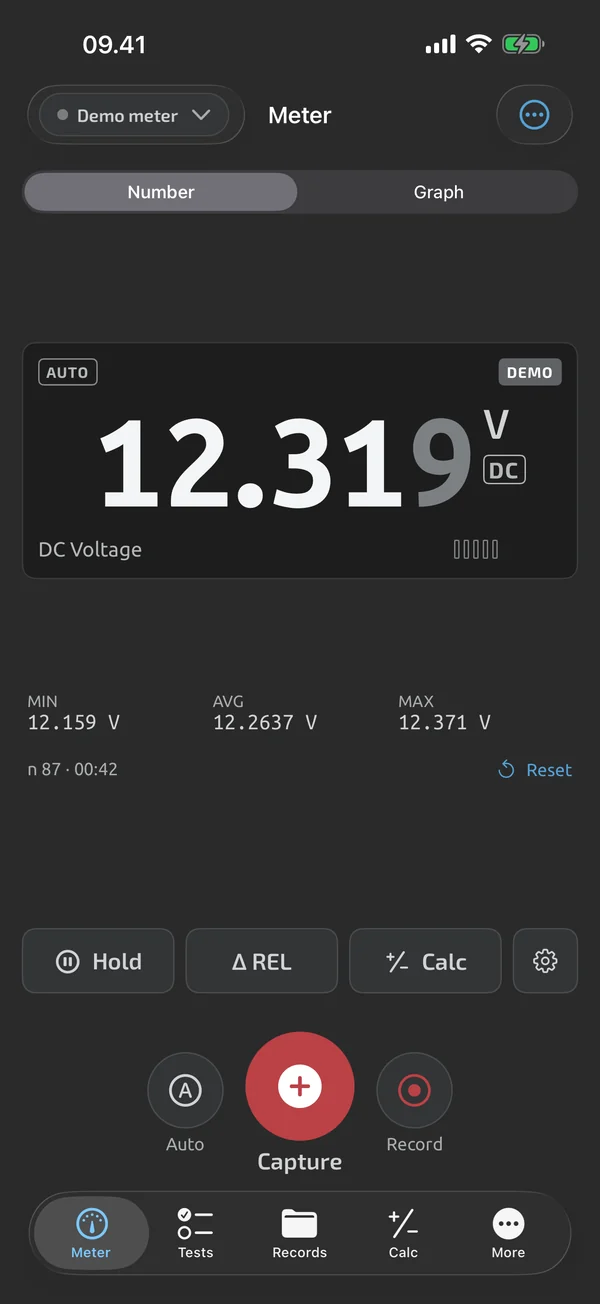
Made for the bench
In landscape the readout sits on the left and the stats and controls on the right. The screen can stay on while you measure, with a setting to choose when. The device chip shows the connection state and the meter's battery when the meter reports it. After a dropped connection the app reconnects to the last-used meter. When a reading goes stale it is struck through and dimmed, never shown as live.
Connecting, and trying without a meter
Works with: the OWON OW18B, verified on hardware, from the OWON family. The OW18E follows after its own hardware test. Only one live Bluetooth meter is connected at a time. The demo meter behaves like a real one and is labelled DEMO, so you can try everything without hardware. Any other instrument can be captured by typing its value, marked manual. See Meters.
Keep the readings
Capture a reading with one tap, or record over time, with notes, photos and voice notes. That is covered under Logging.
In Live meter
Stable-digit readout
A large number where settled digits are brighter than moving ones, plus stability bars, landscape and keep-awake.
Live graph
Swipe the readout to a live graph that auto-scrolls, zooms and shows the value under your finger.
Hold, REL, min/max
Freeze the reading, zero out lead resistance, and see min, max, average and rolling averages.
Scaling
Apply a factor and offset to live readings and captures, with the raw reading kept alongside.
What it does and doesn't do (yet)
| What it does | Plan |
|---|---|
| A large readout that shows which digits have settled; OL and UL are shown as OL and UL, never as a number. | Free |
| Swipe the readout to a live graph with min and max lines, pan and zoom. | Free |
| Hold freezes the displayed reading and statistics in the app, independent of the meter's own HOLD. | Free |
| Shows the running minimum, maximum and average since the last reset, with the sample count. | Free |
| Shows rolling averages over the last 5, 30 and 60 seconds. | Free |
| REL shows the difference from a stored reference, for example to null out test-lead resistance. | Free |
| Five stability bars show when a reading is steady. | Free |
| A landscape layout for the meter and run screens. | Free |
| Keeps the screen on while you measure, run a test or record. | Free |
| A simulated meter lets you try the whole app without hardware; it is labelled DEMO everywhere. | Free |
| Shows the meter's battery, model and firmware where the meter reports them, and warns when its battery is low. | Free |
| Reconnects to your last meter on launch and after drops, and always shows the connection state. | Free |
Not yet, or not planned
- One live Bluetooth meter at a time; two meters live at once is not planned for v1.
- No spoken readout yet.
- Live Bluetooth support is for the OWON OW18B and OW18E only. Other OWON BDM meters may work but aren't claimed; other brands are not planned for v1.
- Can't press the meter's buttons from the phone yet.
- Reads what your meter measures; it doesn't change the meter's accuracy or ranges.
Questions
Does it work offline?
Yes. Connecting to the meter, capturing, templates, test runs, the calculator and every export work without a network. You only need a connection to sign in, sync, use the web app or make a purchase.
Can I use it without a meter?
Yes. The demo meter is simulated and labelled DEMO. You can also add any instrument as a manual instrument and type its readings, which are marked manual. See Meters.
Can it connect two meters at once?
No. Exactly one live Bluetooth meter at a time.
Does it change how my meter measures?
No. TestNMeasure reads what your meter measures; it doesn't change the meter's accuracy or ranges. Use a meter and leads rated for the job, and follow your local safety rules.
Coming to iPhone and Android.
iOS and Android, beta this winter.


Questions or a meter to suggest? Mail support@testnmeasure.app.
No ad networks, no sign-up.