Logging
One-tap capture with notes, photos and voice
One tap saves the reading on screen. Then add a note, photos or a voice note to it.
iOS and Android, beta this winter.
One tap
The Capture button saves the displayed reading, or the held one if Hold is on, with its timestamp, instrument, flags and any active REL or scaling adjustment. It goes into the open log session; if none is open, into an automatic session named for the day. The toast reads Saved, with the value and an Add note link, and Undo stays for 5 s. Taps within 400 ms of a capture are ignored. If the reading is stale, the button reads Capture last, with its age.
Notes, photos and voice
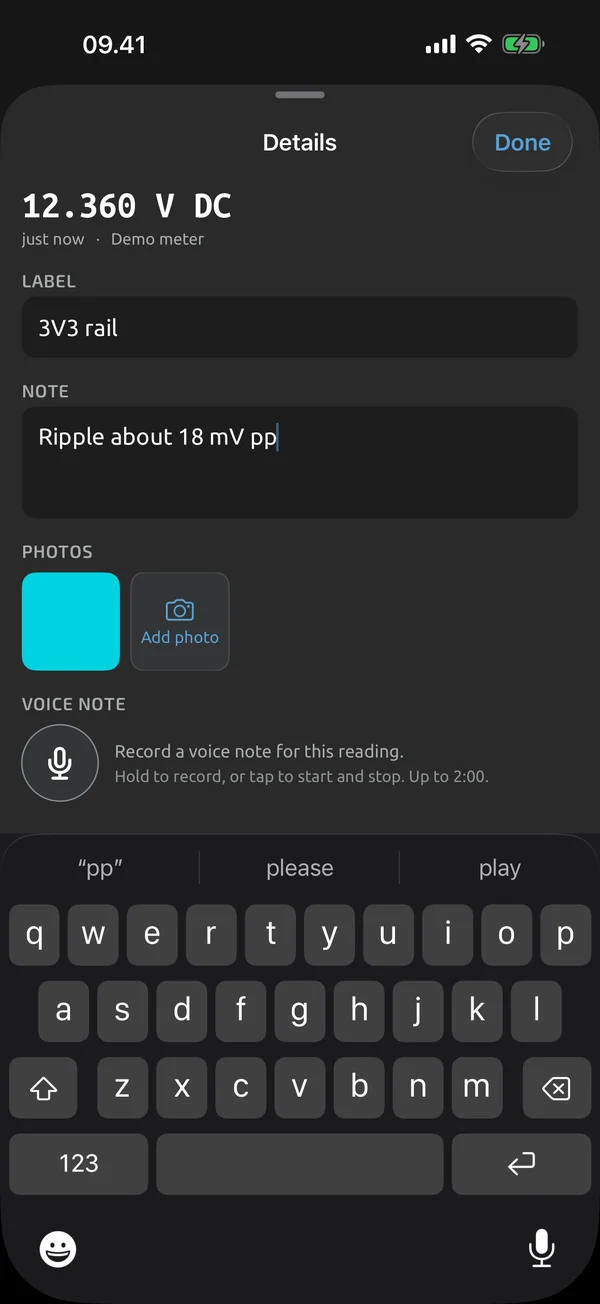
A capture carries one text note of up to 2,000 characters and an optional label of up to 80, for example Pump B inlet. Editing a note never changes the reading. Add up to 5 photos per capture, from the camera or the library. Record one voice note of up to 2 minutes. Notes and labels are included in exports and are searchable in History.
Auto-record on stable
Turn on Auto next to Capture, and a capture fires when the reading becomes stable. It plays the capture haptic, and a beep if you enable it. A stable OL or UL is never auto-captured in a log. Auto-record needs the screen on and the app in the foreground. In guided tests the same detection moves you from step to step: see Auto-capture.
What it does and doesn't do (yet)
| What it does | Plan |
|---|---|
| One tap saves the current reading, with an Undo. | Free |
| Add a text note and a short label to any capture. | Free |
| Attach up to 5 photos to a capture. | Free |
| Record a voice note of up to 2 minutes on a capture. | Free |
| Auto-record saves a capture when the reading becomes stable. | Free |
Not yet, or not planned
- No voice-note transcription.
- Auto-record pauses while the screen is off or the app is in the background.
Questions
Can I undo a capture?
Yes. The toast after a capture shows Undo for 5 s.
Is my photo's location stored?
EXIF GPS is stripped from photos by default. A setting keeps location for photos taken with the camera.
Is there auto-capture outside test runs?
Yes. Turn on Auto next to Capture on the meter screen and a capture fires when the reading becomes stable. It pauses while the screen is off or the app is in the background.
Coming to iPhone and Android.
iOS and Android, beta this winter.


Questions or a meter to suggest? Mail support@testnmeasure.app.
No ad networks, no sign-up.