Logging
Record readings over time, even with the screen locked
Press Record, pick an interval, and the app stores readings over time while you do something else.
iOS and Android, beta this winter.
Intervals
The intervals are every reading, 0.5 s, 1 s, 5 s, 10 s and 60 s. You can set an automatic stop after a duration or a sample count. Each tick stores the latest reading, not an average. Pause, Resume and Stop are always at hand.
While it records
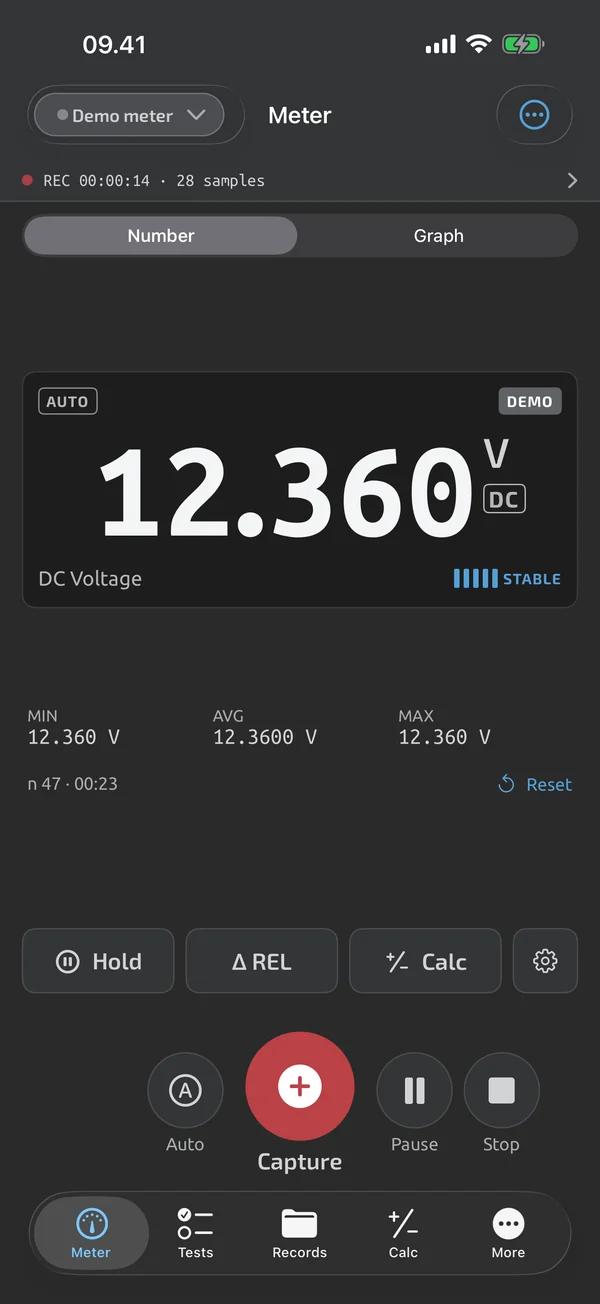
A red recording pill with the elapsed time and sample count shows in the top bar on every screen; tapping it returns to the meter. Recording continues with the app in the background or the screen locked. The screen stays on while a time-series log is recording. On Android a notification shows that logging is running. Captures made during a recording are stored in the same session and drawn as markers on its graph.
Dropped connection or closed app
If the meter connection drops, the app reconnects without ending the recording. If the app is closed mid-recording, the session is paused at the next launch with a gap marker over the missing time. Recording never restarts without a tap. Samples are written in 1-second batches, so a crash loses at most 1 s.
Limits
A session holds up to 1,000,000 samples. At 500,000 a banner suggests stopping, and at the limit recording stops automatically with a notification. There is one open recording per device. To get a recording out, see CSV export and Excel reports.
What it does and doesn't do (yet)
| What it does | Plan |
|---|---|
| Log sessions hold captures and time-series recordings, and recording continues with the screen locked. | Free |
| Reconnects to your last meter on launch and after drops, and always shows the connection state. | Free |
| Keeps the screen on while you measure, run a test or record. | Free |
Not yet, or not planned
- No markers on time-series graphs yet.
- Can't download the meter's own memory yet.
- One open recording per device; up to 1,000,000 samples per session.
Questions
Which intervals can I record at?
Every reading, 0.5 s, 1 s, 5 s, 10 s or 60 s.
What happens if the app is closed mid-recording?
The session is paused at the next launch with a gap marker over the missing time, and the meter screen offers to resume it. Recording never restarts without a tap.
Does it average each interval?
No. Each tick stores the latest reading, not an average.
Coming to iPhone and Android.
iOS and Android, beta this winter.


Questions or a meter to suggest? Mail support@testnmeasure.app.
No ad networks, no sign-up.