Guide · updated 3 November 2026 Free Pro
Pass/fail test procedures for any multimeter
A test procedure is a list of steps, each with the reading you expect. Written once, it makes every run the same: the app checks each reading against its limit and shows PASS or FAIL, whoever holds the probes. It works with a Bluetooth meter or with any other multimeter whose readings you type Pro. Building and running your own procedure is part of Pro, a one-time purchase. Starter templates and templates shared as a file run free.
iOS and Android, beta this winter.
What you need
- A multimeter. A supported Bluetooth meter is captured automatically; with any other meter you type the value. Live support covers the models on the Meters page.
- Pro, to build and run your own template. Without Pro you can run the starter templates and templates shared with you.
- The limits for your equipment, from its documentation.
Build the procedure
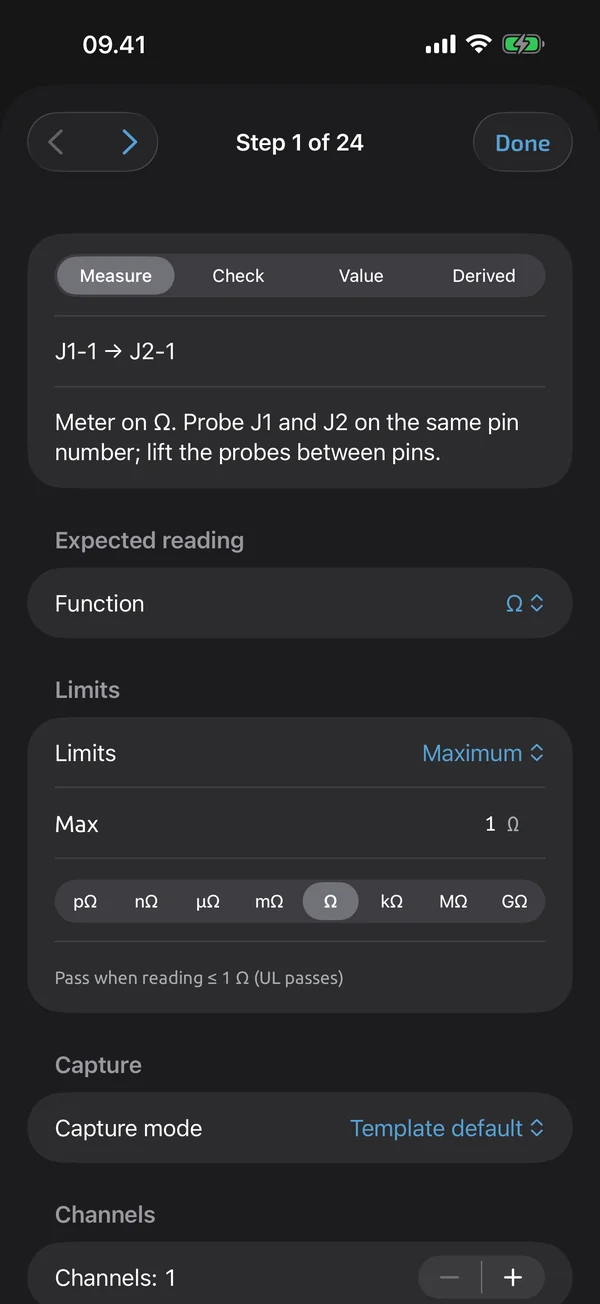
- Add steps. A step is one thing to check. There are four types: measure (take a reading), check (a Pass, Fail or N/A verdict), value (type a value, such as a serial number) and derived (a calculated value) Pro.
- Group them. Put steps under headers, such as one per connector or per circuit, to keep a long list in order Pro.
- Repeat a step. One step can hold many identical points, from 2 to 500 channels, each with its own result Pro.
- Set the limit. Pick the limit type and the numbers Pro.
- Add run fields. Choose what the app asks before a run starts, such as a part number or a serial number that counts up Pro.
Limit types
| Limit | Passes when | Example |
|---|---|---|
| Range | the reading is between a low and a high value | 11.4 to 12.6 V |
| Min | the reading is at or above the value | at least 12.4 V |
| Max | the reading is at or below the value | at most 1 Ω |
| Equals | the reading equals the value | 5.00 V |
| Tolerance | the reading is within a percentage of a nominal value | 100 Ω ± 5 % |
| Expected open | the circuit reads open (OL) | no path from pin to shell |
The bounds are inclusive: a reading exactly on a limit passes Pro. Units compare strictly, so a continuity reading does not satisfy an ohm limit, and a diode reading does not satisfy a volt limit. The examples above are made up to show the types. Set your own limits from your own documentation.
Run it
- Pick the template and fill in the run fields.
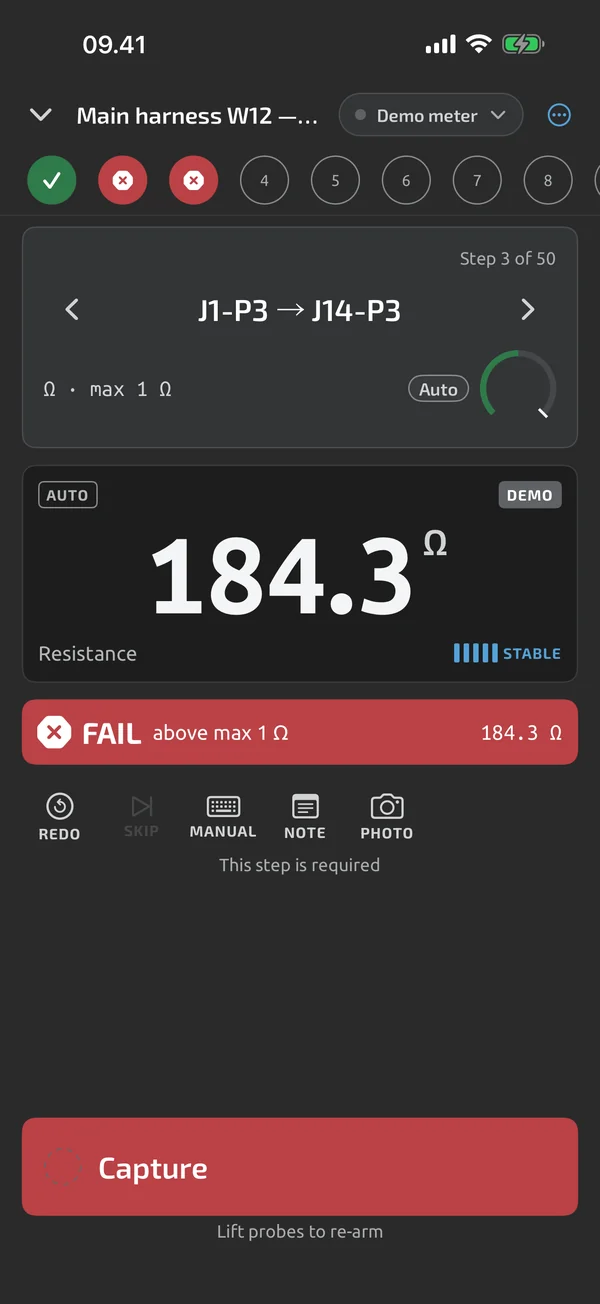
- For each step, take the reading. With a Bluetooth meter, auto-capture saves a steady reading with no tap. With another meter, type it in.
- The app shows PASS or FAIL and moves to the next step.
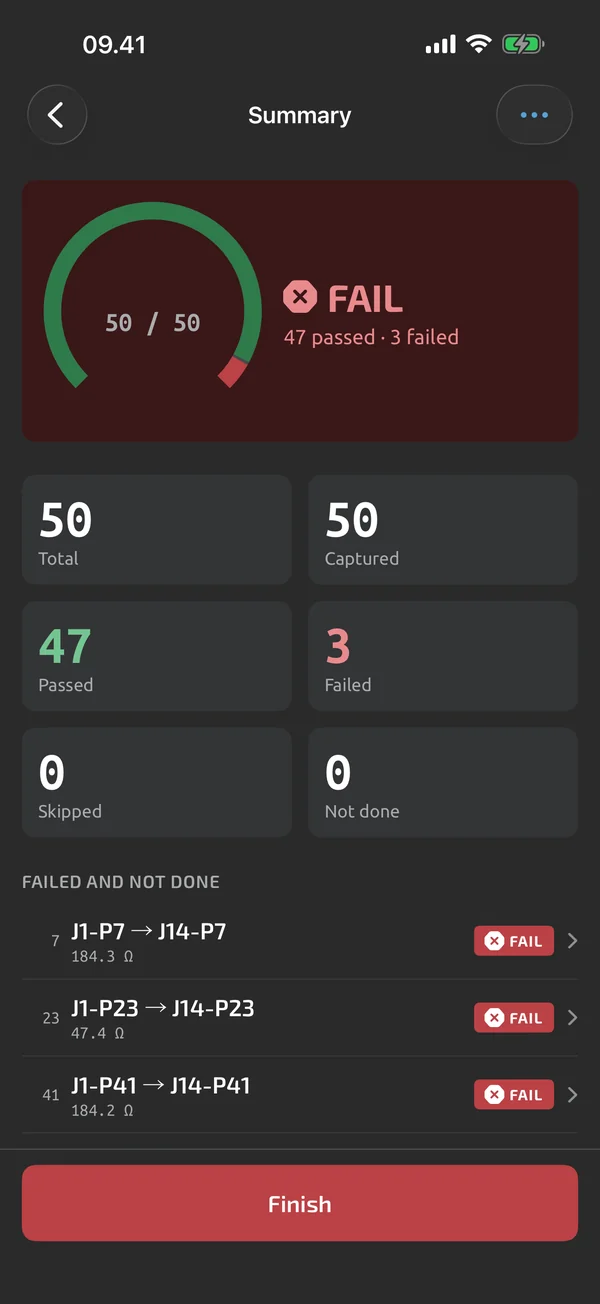
- At the end, the summary shows PASS, FAIL or INCOMPLETE, and the failed steps can be redone.
Run starters for free
The app includes starter templates, and a template shared as a file opens in the app. Both run on the free plan with the full run loop. Starter templates are examples (beta-v1, revisable): check their limits against your equipment's documentation.
The report
A finished run exports as an Excel report with real numeric cells and PASS and FAIL cells, or as a PDF report with a step table and a signature block. Each step has its reading, its limit and its result. Both are free.
What a meter cannot check
A handheld multimeter has limits of its own. Very low resistances, such as milliohm bonding values, need a bond tester. Type its value into a step and set the limit as usual. One public example is AC 43.13-1B para 11-188 f, which gives 2.5 milliohms for equipment frame bonding: example; set your own limits, and the aircraft or component maintenance manual wins over the AC, which is advisory. The file is your record, not a certification, and there are no shared team libraries or reviewer sign-off in the app today.
What the app does here, and what it doesn't
| What it does | Plan |
|---|---|
| Build test templates with steps, groups, limits and run metadata fields. | Pro |
| Four step types: measure, check, value and derived. | Pro |
| Group steps under headers to organise long pin tables. | Pro |
| One step can measure many identical points, 2 to 500 channels, each with its own result. | Pro |
| Set limits per step: range, min, max, equals, tolerance or expected open. Bounds are inclusive. | Pro |
| Starter templates for common tests are included in the app. | Free |
| Capture a step, see PASS or FAIL, and the run moves on to the next step. | Free |
| Saves a steady reading with no tap, and needs a probe lift or a clear change before the next capture. | Free |
| Type a value, or give a Pass, Fail or N/A verdict, when a step needs it. | Free |
| The summary shows PASS, FAIL or INCOMPLETE; finish, abandon, or go back and redo a failed step. | Free |
| Share a template as a .tnmt file that anyone can open in the app. | Free |
| An Excel test report with real numeric cells and PASS and FAIL cells. | Free |
| A PDF test report with header, result, step table, notes, photos and a signature block. | Free |
Pro is a one-time purchase and Cloud is a subscription, both in the app. See what is Free, Pro and Cloud.
Not yet, or not planned
- No teams, shared libraries or reviewer sign-off; not planned for v1.
- A test file is your record, not a certification.
- Units compare strictly: continuity is not Ω, diode is not V.
- Live Bluetooth support is for the meters marked verified or supported on the Meters page; should-work and not-supported meters can be used by typing readings.
Questions
Can I use my own multimeter?
Yes. A supported Bluetooth meter is read live. With any other multimeter, type the reading into the step and the run works the same way.
Do I need Pro to run a procedure?
Your own templates need Pro, a one-time purchase, to build and to run. Starter templates, templates shared as a file, auto-capture, the summary and the Excel and PDF reports are free. One person with Pro can build a procedure and share it with colleagues, who run it free.
What happens at exactly the limit?
It passes. Bounds are inclusive, so 1.000 Ω passes a max of 1 Ω.
Can a team share and review the same procedures?
Not yet. There are no teams, shared libraries or reviewer sign-off, and none is planned for v1. You can share a template as a file that anyone can open in the app.
Coming to iPhone and Android.
iOS and Android, beta this winter.


Questions or a meter to suggest? Mail support@testnmeasure.app.
No ad networks, no sign-up.