Guide · updated 3 November 2026 Free Pro
Test records for aircraft electrical checks, from any Bluetooth multimeter
A hangar check ends with a number and a result: this pin read 0.12 Ω, this bond was typed in as 2 mΩ, this battery rested at 12.7 V. TestNMeasure keeps those numbers with the step, the limit you set and a pass or fail, and exports them as a PDF or an Excel file. The meter takes the reading; the app guides the check and keeps the record.
iOS and Android, beta this winter.
Who it is for
- Line and base mechanics who check a circuit, a switch or a battery and need the number written down.
- Avionics and harness technicians who run a connector with 50 or more pins, three times: after lead-out, after the connectors go on, and installed.
- Battery shops that check open-circuit voltage and keep the reading with the battery.
- Quality managers who want to know what the file holds before anyone uses it. There is a separate sheet for you.
What fits today
- Pin tables. Group the steps by connector, or import the pin table from pasted text, CSV, TSV or an Excel sheet Pro.
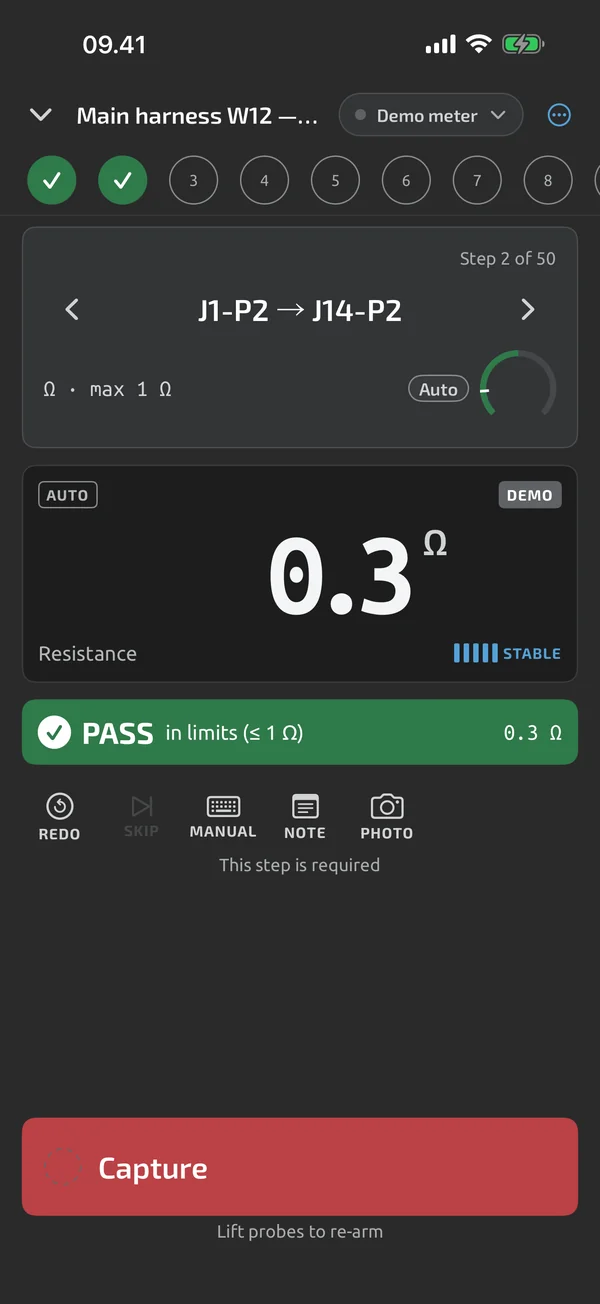
- Hands-free capture. The app saves a steady reading with no tap, so both hands stay on the probes. The next capture needs a probe lift or a clear change.
- Forward, back and recheck. Redo or skip a step, go back and recheck it. Earlier attempts are kept.
- Limits you set. Each step can carry a range, a minimum, a maximum, an exact value, a tolerance or "expected open", and the step shows PASS or FAIL against it Pro.
- Fields you add. Add your own run fields to the template, such as a tail number, a task card number, a part number and a serial number.
- Bond and insulation testers. A handheld multimeter cannot read milliohm bonds. Type the value from the instrument that can; typed values are marked manual.
- Zeroing the leads. Press REL with the leads shorted to cancel the lead resistance.
- Export. CSV, an Excel test report and a PDF test report, all free. Pro adds your company name, the technician's name and a logo to the report header Pro.
- No signal needed. Measuring, running a test and exporting all work on the phone. Your measurements stay on the phone unless you turn on Cloud sync. See Privacy.
What a meter app is not
A meter app is not the maintenance entry. 14 CFR 43.9 in the US and EASA Part-145 point 145.A.55 ask for a description of the work or a reference to the data, the date, and a signature. They do not ask for measured values. The file is the record your work order points to: attach it to the task card, and write the reference in your own entry.
Three more limits to know before you start:
- A test file is your record, not a certification. Your shop's quality system decides what counts as a maintenance record.
- The aircraft or component maintenance manual wins. Every limit in these guides is an example taken from the public FAA advisory circular AC 43.13-1B, which is guidance. Set your own limits from your manual.
- No tamper seal yet. A report fingerprint and a signed timestamp are coming. Teams, reviewer roles and connectors to maintenance systems are not planned for v1.
Your meter, calibrated by you
The meter is the tool. A repair station has to keep its test equipment calibrated to a standard the regulator accepts (14 CFR 145.109(b)), and EASA Part-145 point 145.A.40 asks the same. Calibration stays with your tool control. The app reads what your meter measures; it does not change the meter's accuracy. Each reading is tied to the meter that took it, and the report lists the meter by the name you gave it.
Which check, which instrument
Limits in the third column are examples from AC 43.13-1B. Each one is example; set your own limits.
| Check | Instrument | Where the example limit comes from | Guide |
|---|---|---|---|
| Wire harness, pin to pin | Multimeter, leads zeroed with REL | Your drawing. A per-conductor example from AC 43.13-1B Table 11-9 | Wire harness continuity test |
| Equipment bonds and jumpers | Bond tester; the value is typed in | AC 43.13-1B para 11-188 f, 11-189, 11-192 | Bonding resistance check |
| Static bonds, fuel items | Multimeter with REL | AC 43.13-1B para 11-187 c, 11-191 | Bonding resistance check |
| Battery open-circuit voltage | Multimeter | AC 43.13-1B Table 11-1, para 11-17 | Aircraft battery voltage check |
| Insulation resistance | Megohm tester; the value is typed in | Your manual. AC 43.13-1B has no figure | none yet |
| What the file holds | Not a check | Not a limit | Sheet for quality managers |
Any meter, any procedure
- Pin table from a connector drawing: turn an avionics connector drawing into a pin table and run it.
- Pass/fail procedures for any multimeter: set limits once and run the same procedure with any meter.
- One report from different multimeters: a bond tester typed in and a multimeter read live, in one report.
Starting points that ship today
The app includes starter templates for a 20-pin continuity check, a 12-conductor harness check with shell isolation and a build-stage field, and a 12 V lead-acid starter battery check. They are examples. See starter templates. The aircraft examples in these guides are tables you can build with the template builder Pro, or follow on paper.
What the app does here, and what it doesn't
| What it does | Plan |
|---|---|
| Group steps under headers to organise long pin tables. | Pro |
| Import a pin table from pasted text, a CSV or TSV file or an Excel sheet, and map its columns to step fields. | Pro |
| Set limits per step: range, min, max, equals, tolerance or expected open. Bounds are inclusive. | Pro |
| Start a run with a title and your own metadata fields, such as a serial number that counts up. | Free |
| Saves a steady reading with no tap, and needs a probe lift or a clear change before the next capture. | Free |
| Redo, skip, go back and recheck steps; earlier attempts are kept. | Free |
| Type the reading from any instrument; typed values are marked as manual. | Free |
| Type a value, or give a Pass, Fail or N/A verdict, when a step needs it. | Free |
| REL shows the difference from a stored reference, for example to null out test-lead resistance. | Free |
| Export log sessions and test files as CSV, free. | Free |
| An Excel test report with real numeric cells and PASS and FAIL cells. | Free |
| A PDF test report with header, result, step table, notes, photos and a signature block. | Free |
| Company name, technician and logo in the headers of Excel and PDF reports. | Pro |
Pro is a one-time purchase and Cloud is a subscription, both in the app. See what is Free, Pro and Cloud.
Not yet, or not planned
- A test file is your record, not a certification.
- Starter templates are examples (beta-v1, revisable); you set the limits for your equipment.
- Report fingerprint and signed timestamp are coming.
- No teams, shared libraries or reviewer sign-off; not planned for v1.
- No CMMS/ERP connectors.
- Teams, roles and seats are not planned for v1.
Questions
Is this a maintenance record?
No. It is the record your work order points to. The maintenance entry is made in your own system or logbook, with the description or data reference, the date and the signature your rules ask for. Attach the PDF or Excel file to the task card.
Can a Bluetooth multimeter check bonding?
Not the low limits. Bonding limits are in milliohms, and a handheld meter cannot verify them. Use a bond tester, and type its value into the step. Larger static bonds and fuel items have a limit of about 1 Ω, which a multimeter can check after you zero the leads. See the bonding guide.
Where do the limits come from?
From you. The guides show examples read from the public FAA advisory circular AC 43.13-1B, each with its paragraph. The aircraft or component maintenance manual wins over the advisory circular. You set the limits in the template.
Does it work on the hangar floor without a signal?
Yes. Measuring, running a test and exporting work on the phone with no connection and no account. Cloud sync is optional.
Coming to iPhone and Android.
iOS and Android, beta this winter.


Questions or a meter to suggest? Mail support@testnmeasure.app.
No ad networks, no sign-up.